Article
Git-like Shared Context on Windsurf: Keep Team Constraints Across Sessions
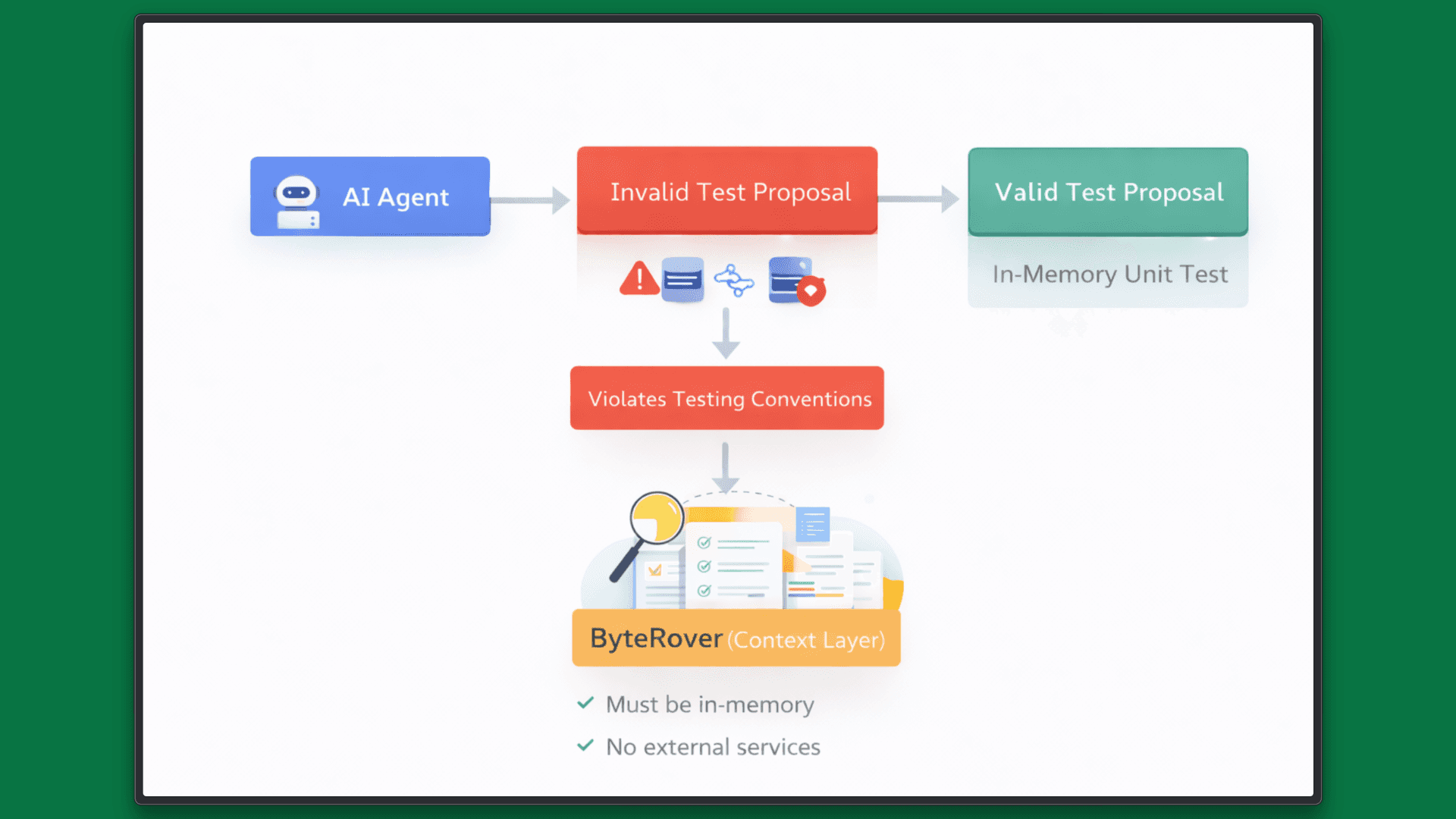
Unit tests are expected to be fast, deterministic, and isolated from external systems. In most teams, rules like “Unit tests must not access the database or network” are enforced implicitly through convention, documentation, or code review rather than as explicit, machine-retrievable constraints.
This approach breaks down once AI agents enter the workflow because each agent session starts without shared institutional context. If constraints are not available at execution time, the agent will make locally reasonable choices that still violate team-level rules.
This article shows a concrete workflow for persisting such constraints across Windsurf sessions. By using ByteRover as a shared context layer, project-level constraints are captured once and automatically retrieved by agents in future sessions without repeated prompting or manual restatement.
The Use Case
This walkthrough focuses on a common failure mode: Unit tests that pass but violate isolation constraints.
The example repository contains an order service with two store implementations:
DatabaseStore, which talks to a real databaseInMemoryStore, which is intended for unit tests
The initial test suite passes while using the database-backed store. From a correctness perspective, nothing is broken. From a testing perspective, the constraint has already been violated.
The goal is not to “fix a bug,” but to encode a team constraint so the agent applies it consistently across sessions.
Tooling and Assumptions
This walkthrough assumes:
Windsurf is used as the primary AI coding environment
ByteRover is installed and enabled for the project (See ByteRover documentation for installation and CLI details)
ByteRover is accessed through its interactive CLI REPL. The commands used below are slash commands executed inside the REPL, not shell commands:
/loginauthenticates the session/initinitializes project context/statusshows pending context changes/pushsyncs context to the shared layer
Step-by-step Walkthrough
Step 1: Inspect the project without constraints
Open the repository in Windsurf.
Ask the agent to review the code and tests:
Analyze the order service and its tests. Identify any testing issues.
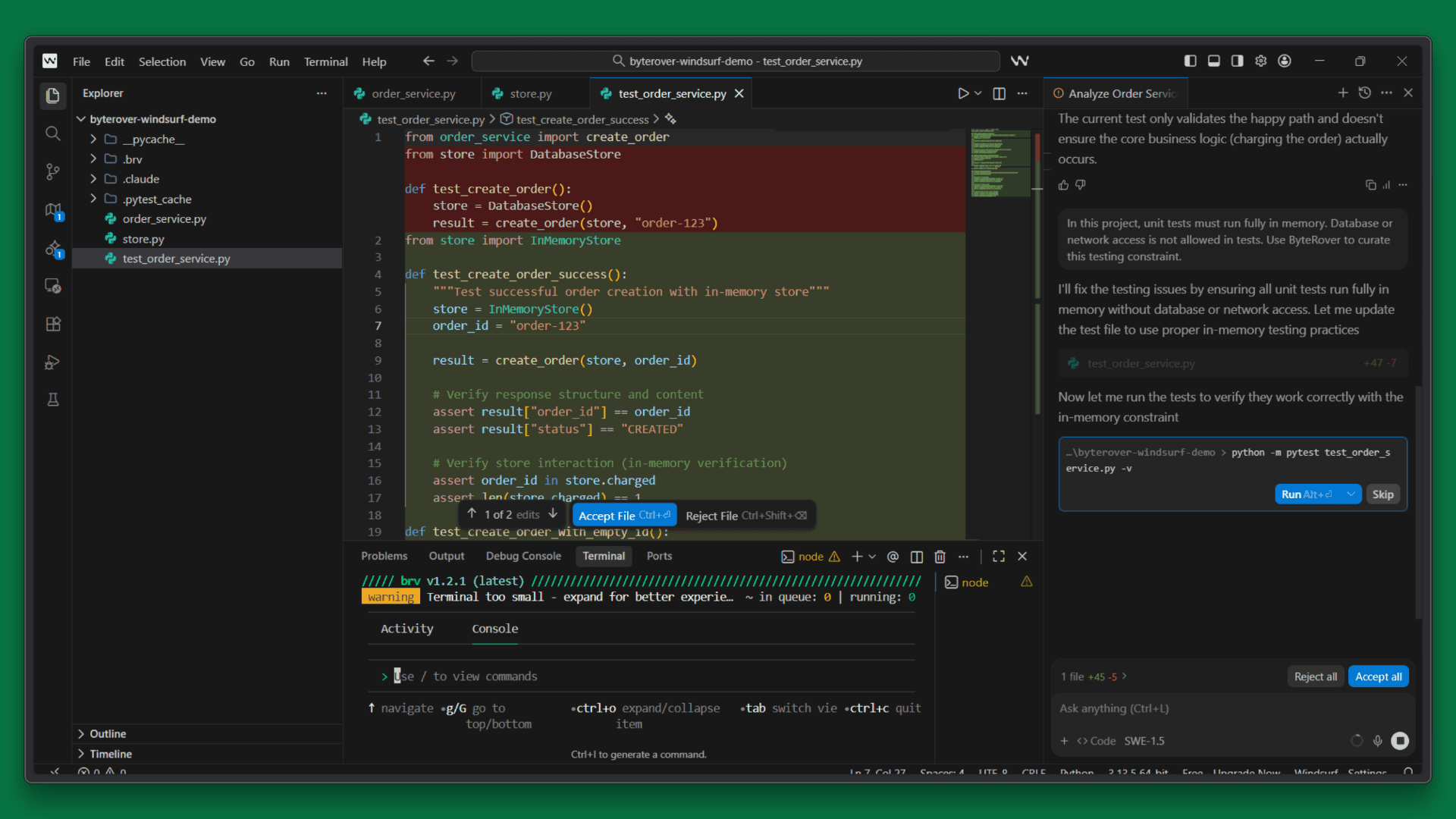
At this stage, the agent typically identifies general concerns such as reliance on real implementations, missing assertions, or weak isolation. However, no explicit constraint has been detected.
Without a defined rule, the agent has no way to distinguish between acceptable and unacceptable test behavior.
Step 2: Capture the team constraint as shared context
Now introduce the constraint explicitly:
In this project, unit tests must run fully in memory. Database or network access is not allowed in tests. Use ByteRover to curate this testing constraint.
This is the key step because the constraint stops being a one-off instruction and becomes part of the project’s persistent context.
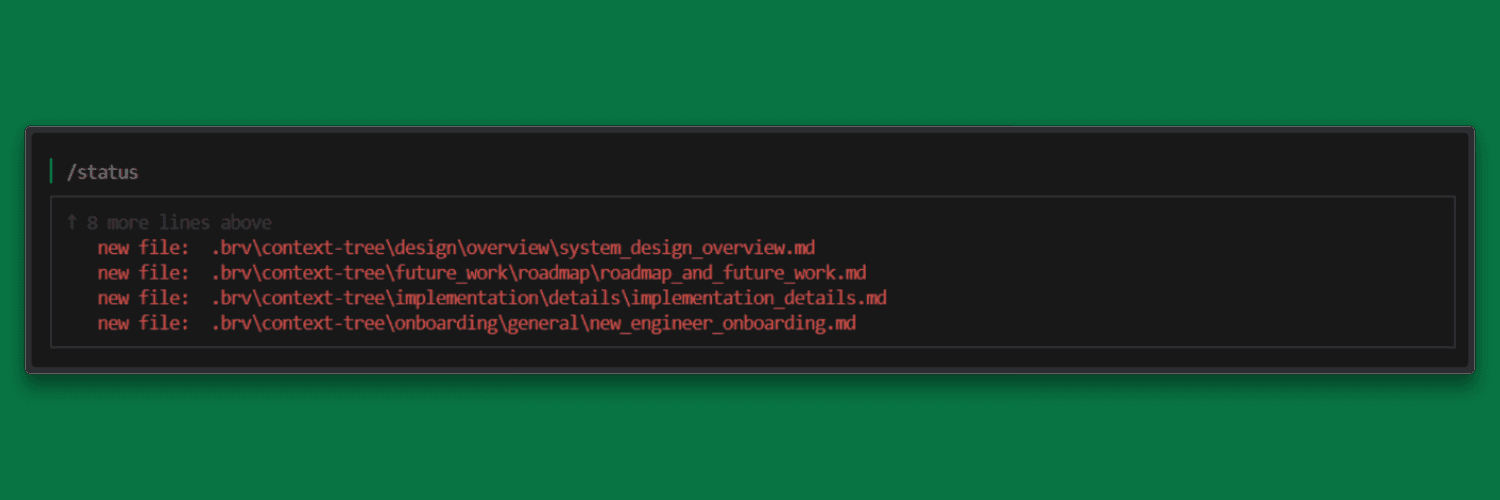
Verify that ByteRover recorded local context changes:
The pending updates appear, showing the newly captured constraint.
Step 3: Apply the Constraint to the Tests
Ask the agent to update the test suite:
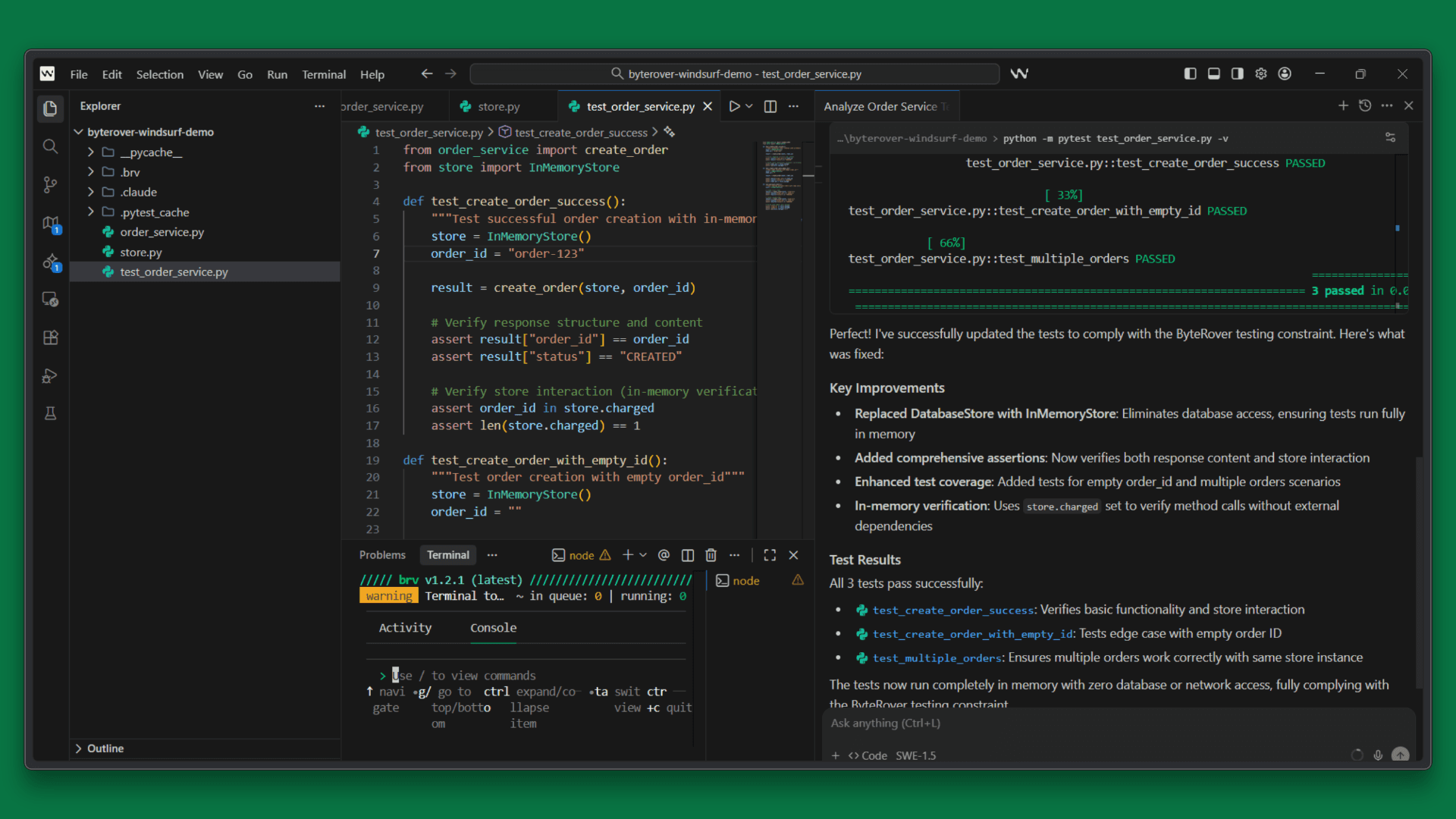
Update the tests to comply with the in-memory testing constraint.
Expected changes include:
Replacing
DatabaseStorewithInMemoryStoreEnsuring no database or network access during test execution
Preserving existing test coverage while enforcing isolation
Run the test suite to validate the result (for example):
The tests should pass while respecting the constraint.
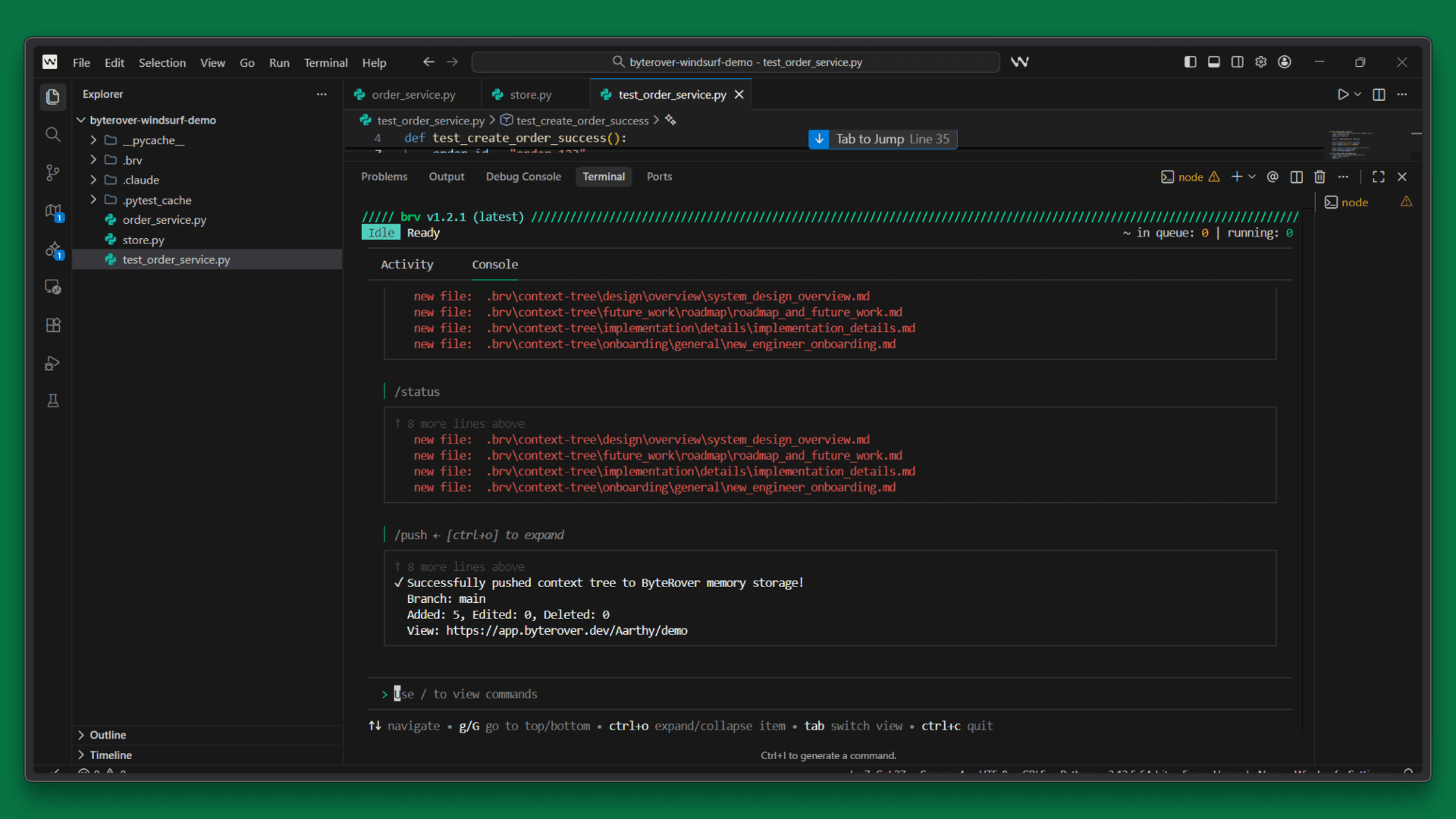
Step 4: Persist the constraint across sessions
Once the constraint has been validated in code, sync it to the shared context layer:
This step makes the constraint available to future agent sessions and to other contributors using the same ByteRover workspace.
Step 5: Verify Context Persistence in a New Session
Close Windsurf and end the current session.
Reopen the project in a fresh session. Do not restate the testing constraint. Ask the agent to extend the test suite:
Add a new unit test that creates multiple orders and validates store behavior.
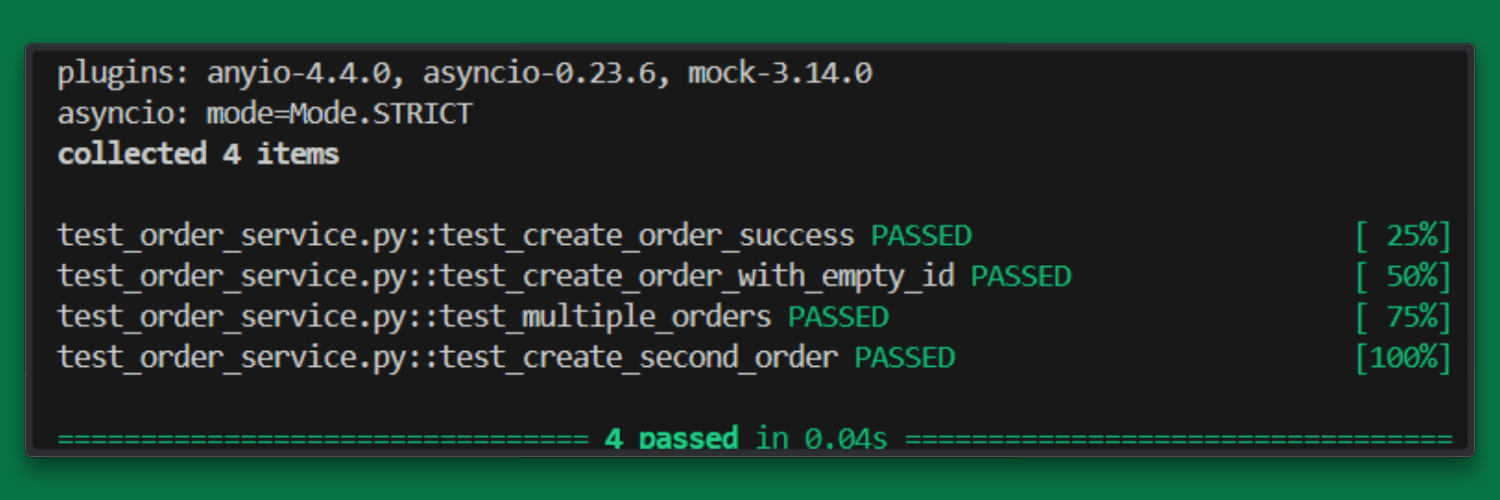
Expected behavior:
The agent defaults to
InMemoryStoreNo database or network access is introduced
The new test follows the same isolation pattern
This confirms that the agent retrieved the constraint from persistent context rather than relying on session memory.
Separating Code from Context
In this workflow, code and context are managed separately.
Code follows the standard Git workflow: review, test, merge.
Context (team constraints and project rules) is curated and synced via ByteRover.
Many teams keep context out of pull requests to avoid mixing executable changes with project metadata. This keeps reviews focused while still ensuring constraints are shared and durable.
Why This Workflow Matters for Teams
Persisting team constraints enables:
Consistent agent behavior across sessions
Reduced regression risk from forgotten rules
Faster onboarding for new contributors
Less repeated instruction and manual oversight
Most importantly, agents operate with the same project assumptions senior engineers expect without relying on implicit knowledge.
Conclusion
If project constraints reset every session, agent autonomy collapses into repeated instruction. By persisting constraints as shared context, Windsurf and ByteRover enable agents to resume work with continuity. Project rules remain stable, retrievable, and enforced over time.
This example focuses on testing, but the same pattern applies to architectural boundaries, security requirements, and performance constraints, etc. - any rule that should hold regardless of who is working or when the work occurs.
Explore how ByteRover supports context management in Windsurf workflows.
View the ByteRover documentation to get started.
The Use Case
This walkthrough focuses on a common failure mode: Unit tests that pass but violate isolation constraints.
The example repository contains an order service with two store implementations:
DatabaseStore, which talks to a real databaseInMemoryStore, which is intended for unit tests
The initial test suite passes while using the database-backed store. From a correctness perspective, nothing is broken. From a testing perspective, the constraint has already been violated.
The goal is not to “fix a bug,” but to encode a team constraint so the agent applies it consistently across sessions.
Tooling and Assumptions
This walkthrough assumes:
Windsurf is used as the primary AI coding environment
ByteRover is installed and enabled for the project (See ByteRover documentation for installation and CLI details)
ByteRover is accessed through its interactive CLI REPL. The commands used below are slash commands executed inside the REPL, not shell commands:
/loginauthenticates the session/initinitializes project context/statusshows pending context changes/pushsyncs context to the shared layer
Step-by-step Walkthrough
Step 1: Inspect the project without constraints
Open the repository in Windsurf.
Ask the agent to review the code and tests:
Analyze the order service and its tests. Identify any testing issues.
At this stage, the agent typically identifies general concerns such as reliance on real implementations, missing assertions, or weak isolation. However, no explicit constraint has been detected.
Without a defined rule, the agent has no way to distinguish between acceptable and unacceptable test behavior.
Step 2: Capture the team constraint as shared context
Now introduce the constraint explicitly:
In this project, unit tests must run fully in memory. Database or network access is not allowed in tests. Use ByteRover to curate this testing constraint.
This is the key step because the constraint stops being a one-off instruction and becomes part of the project’s persistent context.
Verify that ByteRover recorded local context changes:
The pending updates appear, showing the newly captured constraint.
Step 3: Apply the Constraint to the Tests
Ask the agent to update the test suite:
Update the tests to comply with the in-memory testing constraint.
Expected changes include:
Replacing
DatabaseStorewithInMemoryStoreEnsuring no database or network access during test execution
Preserving existing test coverage while enforcing isolation
Run the test suite to validate the result (for example):
The tests should pass while respecting the constraint.
Step 4: Persist the constraint across sessions
Once the constraint has been validated in code, sync it to the shared context layer:
This step makes the constraint available to future agent sessions and to other contributors using the same ByteRover workspace.
Step 5: Verify Context Persistence in a New Session
Close Windsurf and end the current session.
Reopen the project in a fresh session. Do not restate the testing constraint. Ask the agent to extend the test suite:
Add a new unit test that creates multiple orders and validates store behavior.
Expected behavior:
The agent defaults to
InMemoryStoreNo database or network access is introduced
The new test follows the same isolation pattern
This confirms that the agent retrieved the constraint from persistent context rather than relying on session memory.
Separating Code from Context
In this workflow, code and context are managed separately.
Code follows the standard Git workflow: review, test, merge.
Context (team constraints and project rules) is curated and synced via ByteRover.
Many teams keep context out of pull requests to avoid mixing executable changes with project metadata. This keeps reviews focused while still ensuring constraints are shared and durable.
Why This Workflow Matters for Teams
Persisting team constraints enables:
Consistent agent behavior across sessions
Reduced regression risk from forgotten rules
Faster onboarding for new contributors
Less repeated instruction and manual oversight
Most importantly, agents operate with the same project assumptions senior engineers expect without relying on implicit knowledge.
Conclusion
If project constraints reset every session, agent autonomy collapses into repeated instruction. By persisting constraints as shared context, Windsurf and ByteRover enable agents to resume work with continuity. Project rules remain stable, retrievable, and enforced over time.
This example focuses on testing, but the same pattern applies to architectural boundaries, security requirements, and performance constraints, etc. - any rule that should hold regardless of who is working or when the work occurs.
Explore how ByteRover supports context management in Windsurf workflows.
View the ByteRover documentation to get started.
The Use Case
This walkthrough focuses on a common failure mode: Unit tests that pass but violate isolation constraints.
The example repository contains an order service with two store implementations:
DatabaseStore, which talks to a real databaseInMemoryStore, which is intended for unit tests
The initial test suite passes while using the database-backed store. From a correctness perspective, nothing is broken. From a testing perspective, the constraint has already been violated.
The goal is not to “fix a bug,” but to encode a team constraint so the agent applies it consistently across sessions.
Tooling and Assumptions
This walkthrough assumes:
Windsurf is used as the primary AI coding environment
ByteRover is installed and enabled for the project (See ByteRover documentation for installation and CLI details)
ByteRover is accessed through its interactive CLI REPL. The commands used below are slash commands executed inside the REPL, not shell commands:
/loginauthenticates the session/initinitializes project context/statusshows pending context changes/pushsyncs context to the shared layer
Step-by-step Walkthrough
Step 1: Inspect the project without constraints
Open the repository in Windsurf.
Ask the agent to review the code and tests:
Analyze the order service and its tests. Identify any testing issues.
At this stage, the agent typically identifies general concerns such as reliance on real implementations, missing assertions, or weak isolation. However, no explicit constraint has been detected.
Without a defined rule, the agent has no way to distinguish between acceptable and unacceptable test behavior.
Step 2: Capture the team constraint as shared context
Now introduce the constraint explicitly:
In this project, unit tests must run fully in memory. Database or network access is not allowed in tests. Use ByteRover to curate this testing constraint.
This is the key step because the constraint stops being a one-off instruction and becomes part of the project’s persistent context.
Verify that ByteRover recorded local context changes:
The pending updates appear, showing the newly captured constraint.
Step 3: Apply the Constraint to the Tests
Ask the agent to update the test suite:
Update the tests to comply with the in-memory testing constraint.
Expected changes include:
Replacing
DatabaseStorewithInMemoryStoreEnsuring no database or network access during test execution
Preserving existing test coverage while enforcing isolation
Run the test suite to validate the result (for example):
The tests should pass while respecting the constraint.
Step 4: Persist the constraint across sessions
Once the constraint has been validated in code, sync it to the shared context layer:
This step makes the constraint available to future agent sessions and to other contributors using the same ByteRover workspace.
Step 5: Verify Context Persistence in a New Session
Close Windsurf and end the current session.
Reopen the project in a fresh session. Do not restate the testing constraint. Ask the agent to extend the test suite:
Add a new unit test that creates multiple orders and validates store behavior.
Expected behavior:
The agent defaults to
InMemoryStoreNo database or network access is introduced
The new test follows the same isolation pattern
This confirms that the agent retrieved the constraint from persistent context rather than relying on session memory.
Separating Code from Context
In this workflow, code and context are managed separately.
Code follows the standard Git workflow: review, test, merge.
Context (team constraints and project rules) is curated and synced via ByteRover.
Many teams keep context out of pull requests to avoid mixing executable changes with project metadata. This keeps reviews focused while still ensuring constraints are shared and durable.
Why This Workflow Matters for Teams
Persisting team constraints enables:
Consistent agent behavior across sessions
Reduced regression risk from forgotten rules
Faster onboarding for new contributors
Less repeated instruction and manual oversight
Most importantly, agents operate with the same project assumptions senior engineers expect without relying on implicit knowledge.
Conclusion
If project constraints reset every session, agent autonomy collapses into repeated instruction. By persisting constraints as shared context, Windsurf and ByteRover enable agents to resume work with continuity. Project rules remain stable, retrievable, and enforced over time.
This example focuses on testing, but the same pattern applies to architectural boundaries, security requirements, and performance constraints, etc. - any rule that should hold regardless of who is working or when the work occurs.
Explore how ByteRover supports context management in Windsurf workflows.
View the ByteRover documentation to get started.