Article
Reducing Token Usage by 83%: File-based vs. ByteRover
Context handoffs create a lot of friction in AI-assisted workflows. When developers take over tasks from teammates, AI coding tools often have to go through the codebase to understand the project structure. Even a simple question like "Where is the server rendering logic?" can use over 10,000 tokens because the AI needs to load many files just to regain context.
To quantify this "context tax", we ran a controlled benchmark on the Next.js framework repository (1,247 files, ~487k LOC). We compared standard file-based context (Cursor) against ByteRover’s memory layer across four common developer tasks:
Architecture exploration
Feature implementation
Debugging
Build configuration changes
The results were clear. By shifting from file-searching to memory-based retrieval, we observed an ~83% reduction in token cost per query, along with lower latency and higher relevance.
This improvement wasn't due to better prompts or simpler questions, but specifically how context was managed. We break this analysis into three scenarios:
Scenario 1: No File Tagging - Cursor’s semantic search automatically selects the context.
Scenario 2: Manual File Tagging - Developers use
@to manually select specific files.Scenario 3: ByteRover Memory Layer - Persistent architectural knowledge is stored and retrieved.
Scenario 1: No File Tagging (Automatic Context)
When developers ask questions without using @ to tag specific files, Cursor’s semantic search automatically selects the context. This workflow is common when developers are exploring an unfamiliar codebase, investigating a new feature area, or simply trusting the tool to find the relevant code.
In this scenario, the specific files loaded into context were determined entirely by Cursor's semantic search and relevance scoring algorithms.

Query Type | Query Example | Files Loaded | Input Tokens | Output Tokens | Total Tokens | Cost | TTFT |
|---|---|---|---|---|---|---|---|
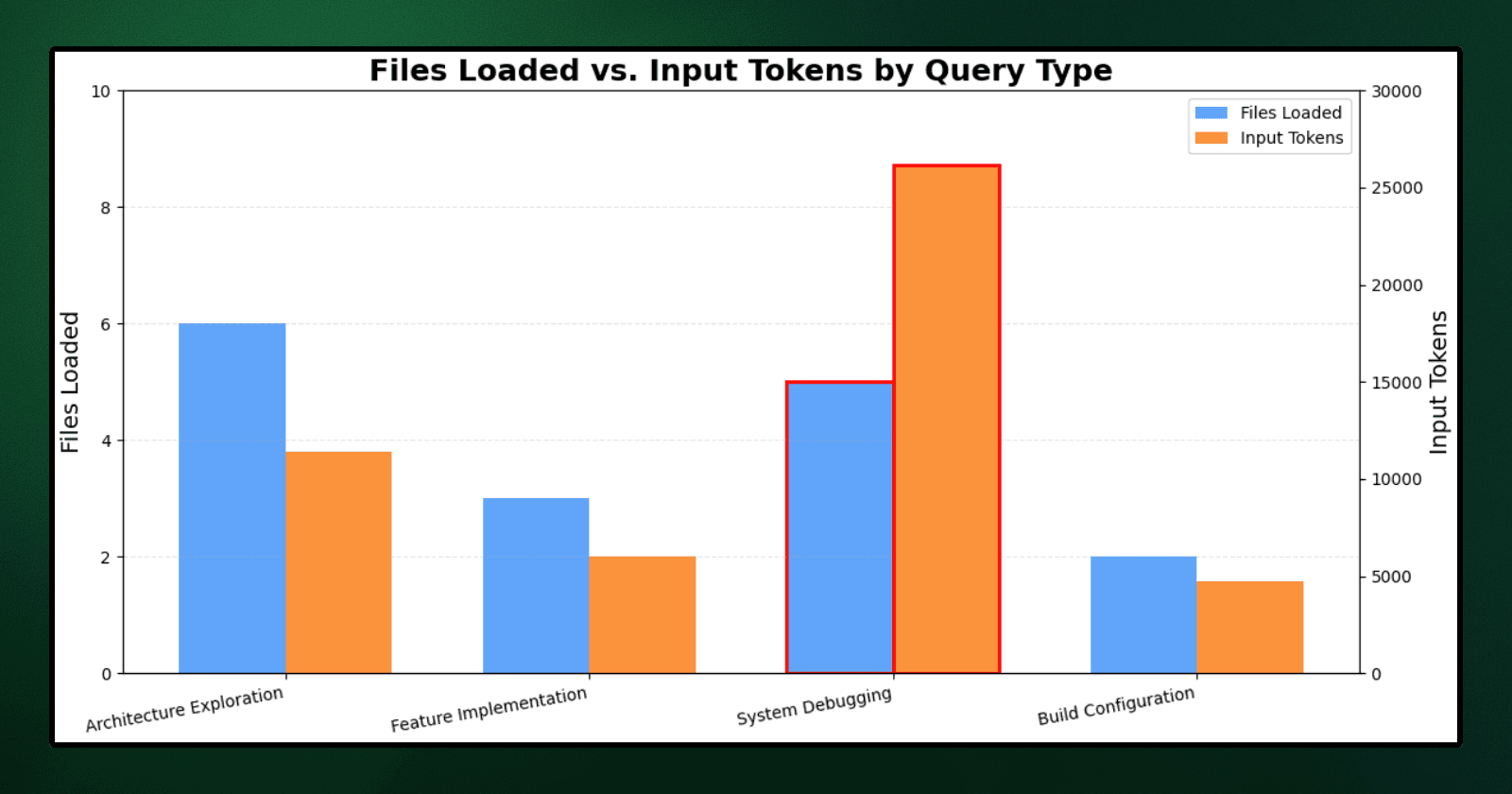
Architecture Exploration | "Where is server component rendering logic?" | 6 | 11,409 | 1,712 | 13,121 | $0.0597 | 19s |
Feature Implementation | "How does middleware rewriting work? Where do I add geolocation support?" | 3 | 6,013 | 7,894 | 13,907 | $0.1366 | 23s |
System Debugging | "How is router cache invalidation structured?" | 5 | 26,133 | 2,069 | 28,202 | $0.1091 | 32s |
Build Configuration | "Show webpack integration and loader setup for markdown files" | 2 | 4,699 | 6,229 | 10,928 | $0.1078 | 15s |
Average | ~8 | 12,064 | 4,476 | 16,540 | $0.1033 | 22.25s |
Cost = (Input Tokens × $3 / M) + (Output Tokens × $15 / M)
Auto-selection triggered multiple search passes per query. For the cache invalidation question, Cursor ran searches for "router cache invalid", "revalidate", and related terms before loading any files.
The system debugging query consumed 26,133 input tokens across multiple search iterations - more than double the baseline for manual tagging.
Even though the middleware query loaded only 3 files, it still required 23 seconds to generate the first token. This delay occurred because Cursor searched for examples, grepped for "rewrite" patterns, and explored directory structures before finally selecting the relevant code.
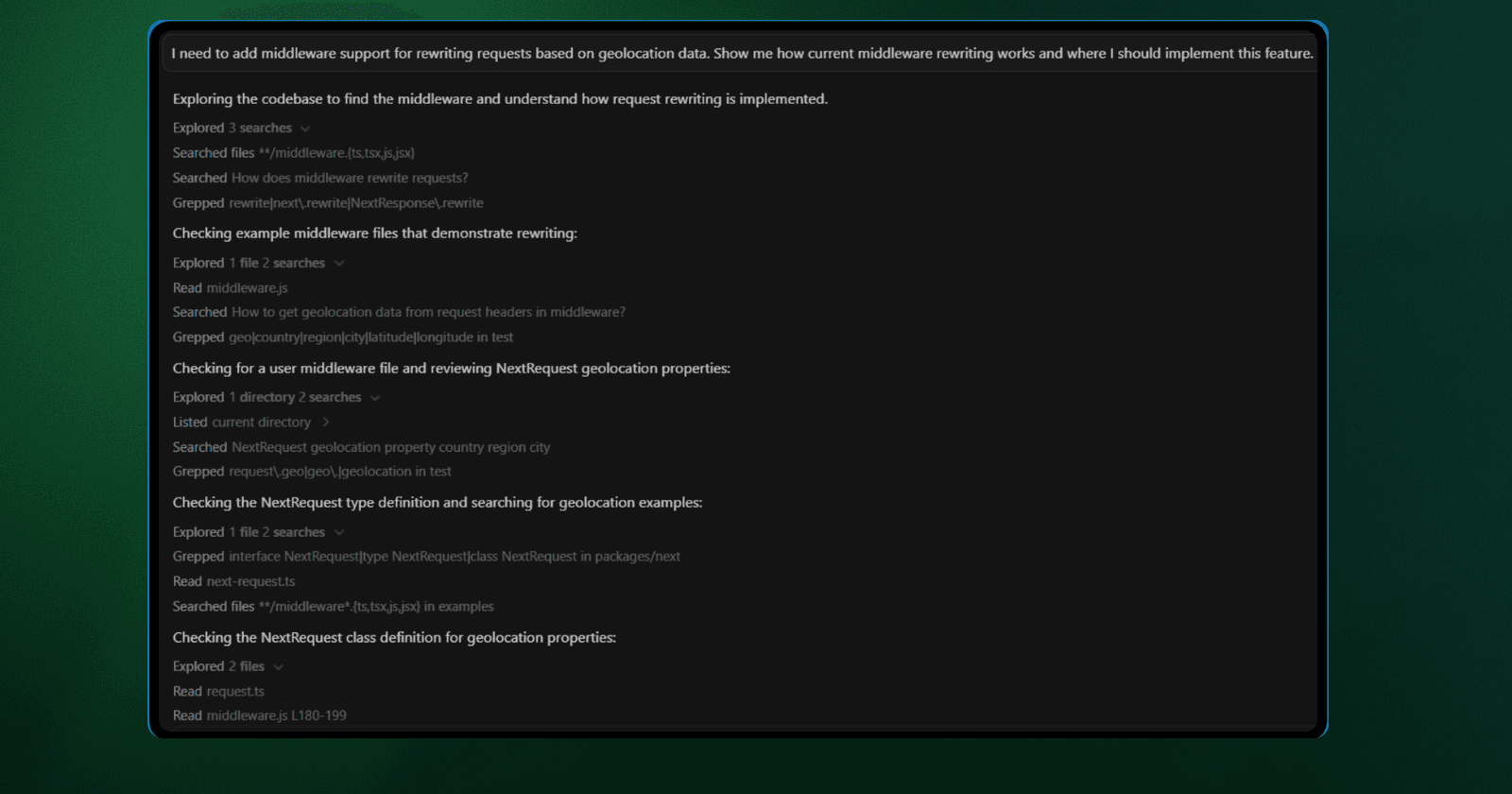
Cursor's search results showing multiple file matches for "middleware"
Even though file counts stayed relatively low (3-6 files), token costs remained high due to:
Multiple search operations triggered per query.
Loading full file contents after each search iteration.
Exploring tangential code paths before finding the answer.
Scenario 2: Manual File Tagging
When developers use @ to tag specific files before asking a question, they are telling Cursor exactly where to look. This workflow occurs when a developer already understands the architecture or has explored the codebase enough to identify the relevant files themselves.
These file counts represent the minimum set identified through manual inspection. In this scenario, the developer (not the AI) selects the exact files that contain the necessary context to answer each query.

Query Type | Query Example | Files Tagged | Input Tokens | Output Tokens | Total Tokens | Cost | TTFT |
|---|---|---|---|---|---|---|---|
Architecture Exploration | "Where is server component rendering logic?" | 4 | 6,260 | 279 | 6,539 | $0.024 | 10s |
Feature Implementation | "How does middleware rewriting work? Where do I add geolocation support?" | 4 | 9,850 | 2,295 | 12,145 | $0.064 | 14s |
System Debugging | "How is router cache invalidation structured?" | 5 | 10,416 | 850 | 11,266 | $0.044 | 6s |
Build Configuration | "Show webpack integration and loader setup for markdown files" | 5 | 18,743 | 1,312 | 20,055 | $0.076 | 14s |
Average | 4.5 | 11,317 | 1,184 | 12,501 | $0.052 | 11s |
Even with precise file selection, queries averaged over 10,000 tokens. Our analysis identified two primary drivers for this overhead:
Distributed Architecture: A single Webpack loader query forced the ingestion of five distinct files (e.g.,
webpack-config.ts, helpers, constants) simply because the configuration logic is fragmented across the project structure.Full-File Loading: Manual tagging offered minimal relief. The middleware query dropped from 13,907 to 12,145 tokens, but still burned 9,850 input tokens because the AI was forced to ingest unrelated type definitions and adapters found within the target files.
Ultimately, ~16% of the loaded context was zero-value noise, consisting of false-positive test fixtures and tangential imports that diluted the prompt without aiding the solution.
No File Tagging vs Manual File Tagging Comparison
Query Type | No Tagging (Files/Tokens) | Manual Tagging (Files/Tokens) | Difference |
|---|---|---|---|
Architecture Exploration | 6 files / 13,121 tokens | 4 files / 6,539 tokens | -6,582 tokens (-50.2%) |
Feature Implementation | 3 files / 13,907 tokens | 4 files / 12,145 tokens | -1,762 tokens (-12.7%) |
System Debugging | 5 files / 28,202 tokens | 5 files / 11,266 tokens | -16,936 tokens (-60.0%) |
Build Configuration | 2 files / 10,928 tokens | 5 files / 20,055 tokens | +9,127 tokens (+83.5%) |
Average | ~4 files / 16,540 tokens | 4.5 files / 12,501 tokens | -4,039 tokens (-24.4%) |
Manual tagging reduced token usage by 24% on average, but both approaches share a fundamental flaw: they rebuild context from scratch every time.
If another developer asks the same question an hour later, Cursor reloads the same files all over again. This is where persistent architectural memory changes the equation. Instead of loading raw files to reconstruct its understanding every single time, the system stores that understanding once and retrieves it directly when needed.
Scenario 3: ByteRover Memory Layer
Scenarios 1 and 2 demonstrated the limitations of file-based context loading, whether done through automatic search or manual tagging. Both approaches suffer from the same inefficiency: they force the AI to rebuild its understanding from scratch for every single query.
ByteRover takes a different approach. Instead of reloading files repeatedly, it uses the domain-structured memory and intent-aware retrieval. This allows the system to store its understanding of the codebase once and retrieve it instantly when needed, rather than parsing raw files for every request. (For the full technical configuration, check out our setup docs)
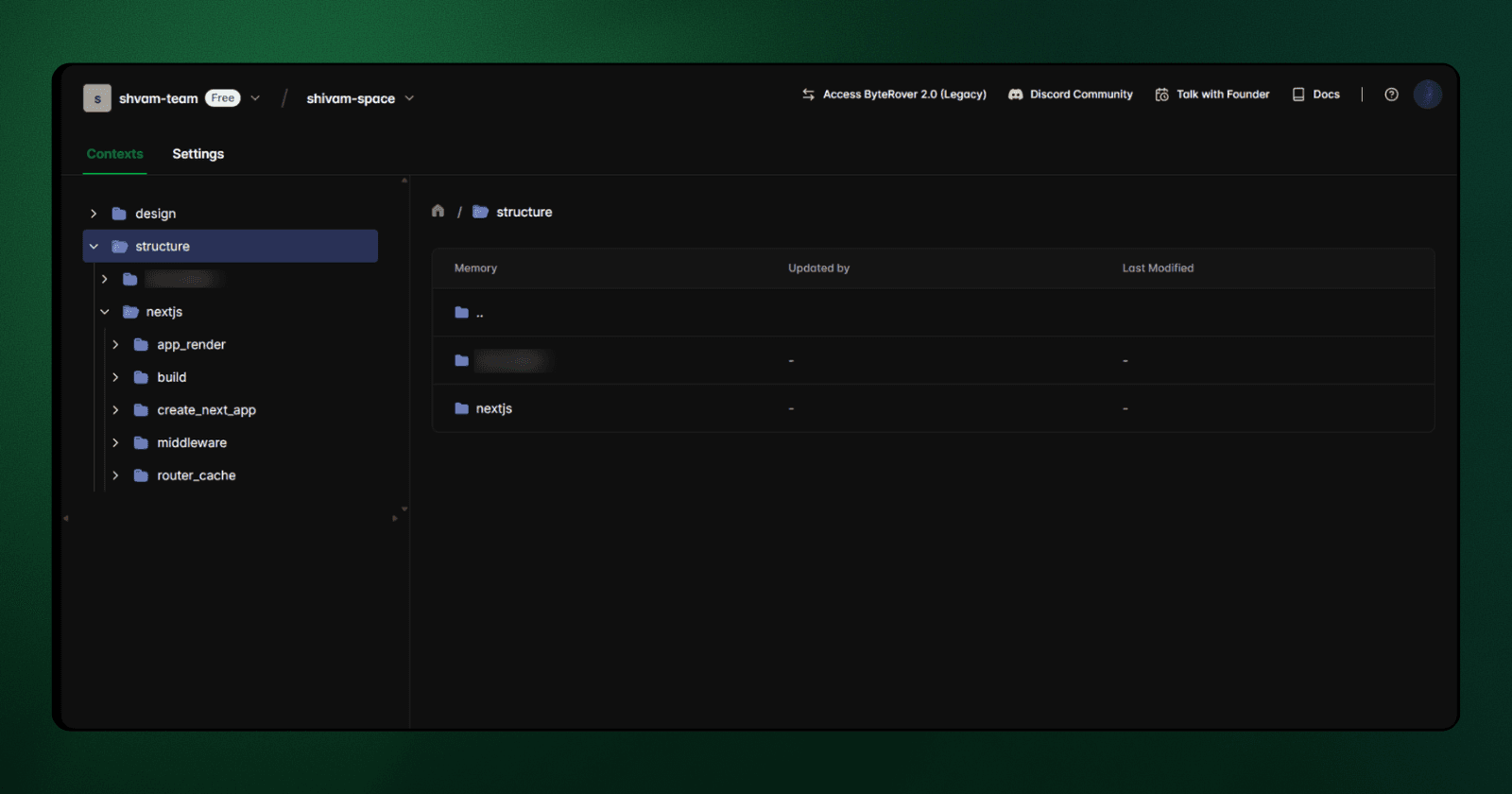
Measured Results
We reran the same four queries from Section 2 using ByteRover's memory layer. Instead of tagging files with @, we instructed the agent to query the curated context:
Use brv to find where server component rendering is implemented

The agent retrieved architectural memories first, supplementing them with targeted code inspection only where necessary. Here are the results:
Query Type | Input Tokens | Output Tokens | Total Tokens | Cost | TTFT |
|---|---|---|---|---|---|
Architecture Exploration | 357 | 574 | 931 | $0.0097 | 7s |
Feature Implementation | 357 | 1,057 | 1,414 | $0.0169 | 3s |
System Debugging | 202 | 341 | 543 | $0.0057 | 19s |
Build Configuration | 1,949 | 3,570 | 5,519 | $0.0591 | 5s |
Average | 716 | 1,386 | 2,102 | $0.0229 | 17s |
Key Findings:
Compared to the manual tagging baseline, input tokens dropped from an average of 11,317 to just 716. Consequently, total tokens per query fell from 12,501 to 2,102. Interestingly, output tokens increased slightly; this suggests the agent was able to focus more on explaining the solution rather than struggling to process the context.
The difference comes down to how tokens are allocated. In the file-based workflow, the majority of input tokens are consumed by loading and parsing source files that may only be partially relevant. With a memory layer, specific structural knowledge is retrieved directly, effectively eliminating that overhead.
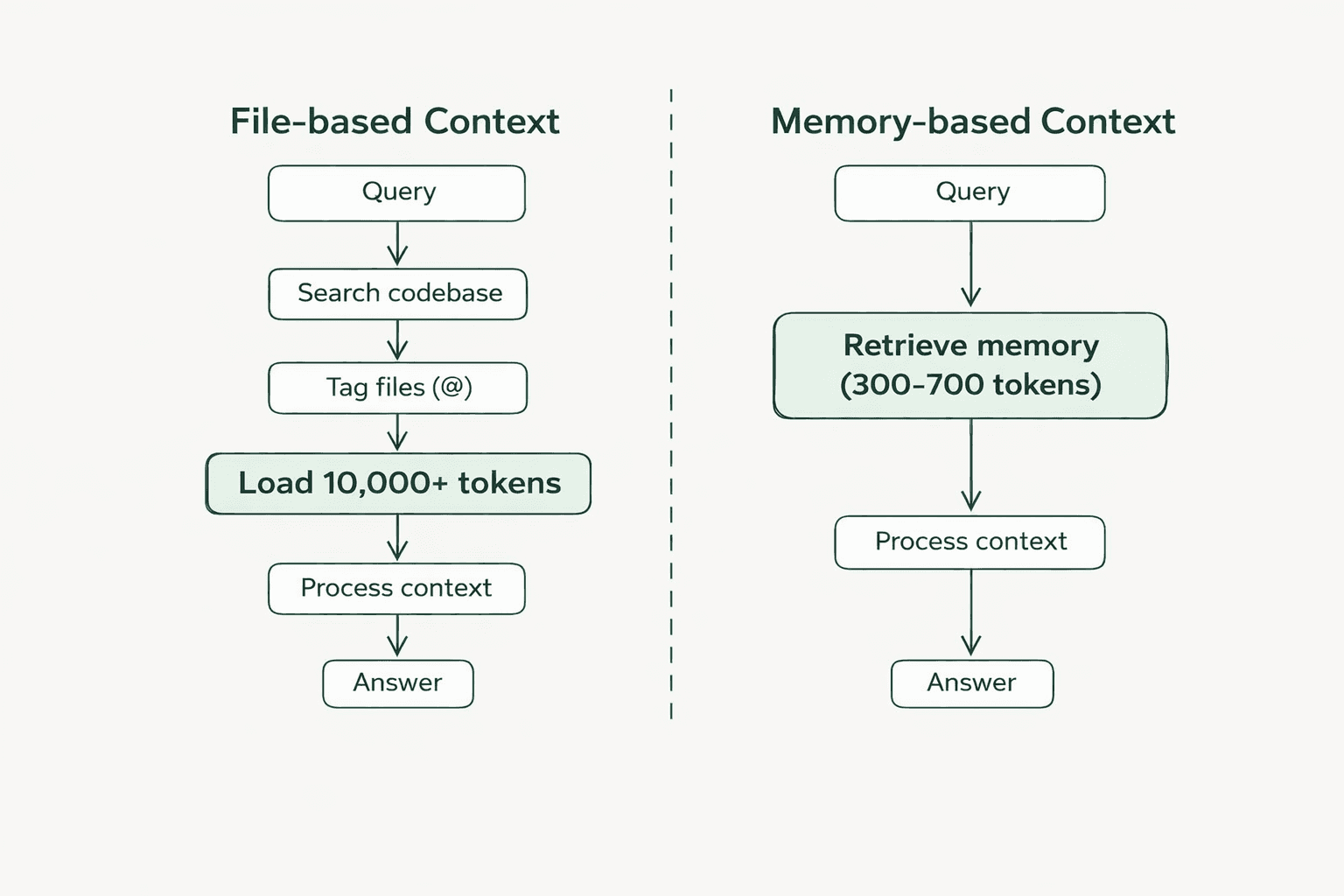
Token Cost Breakdown by Query Type
The four queries we tested fall into distinct categories, each showing different patterns of token reduction based on their scope and architectural complexity.
For these comparisons, we use the manual tagging baseline as our reference point. Manual tagging represents the "best-case" file-based workflow, where developers already know exactly which files to load. If ByteRover reduces tokens even in this optimized scenario, the benefit is genuine. Comparing against the no-tagging (auto-selection) results would simply inflate the numbers, without proving the memory layer's value over a skilled developer making precise file selections.
How token usage breaks down by category:
Scenario Type | Query Example | Baseline Tokens | ByteRover Tokens | Token Reduction | Cost Savings | % Saved |
|---|---|---|---|---|---|---|
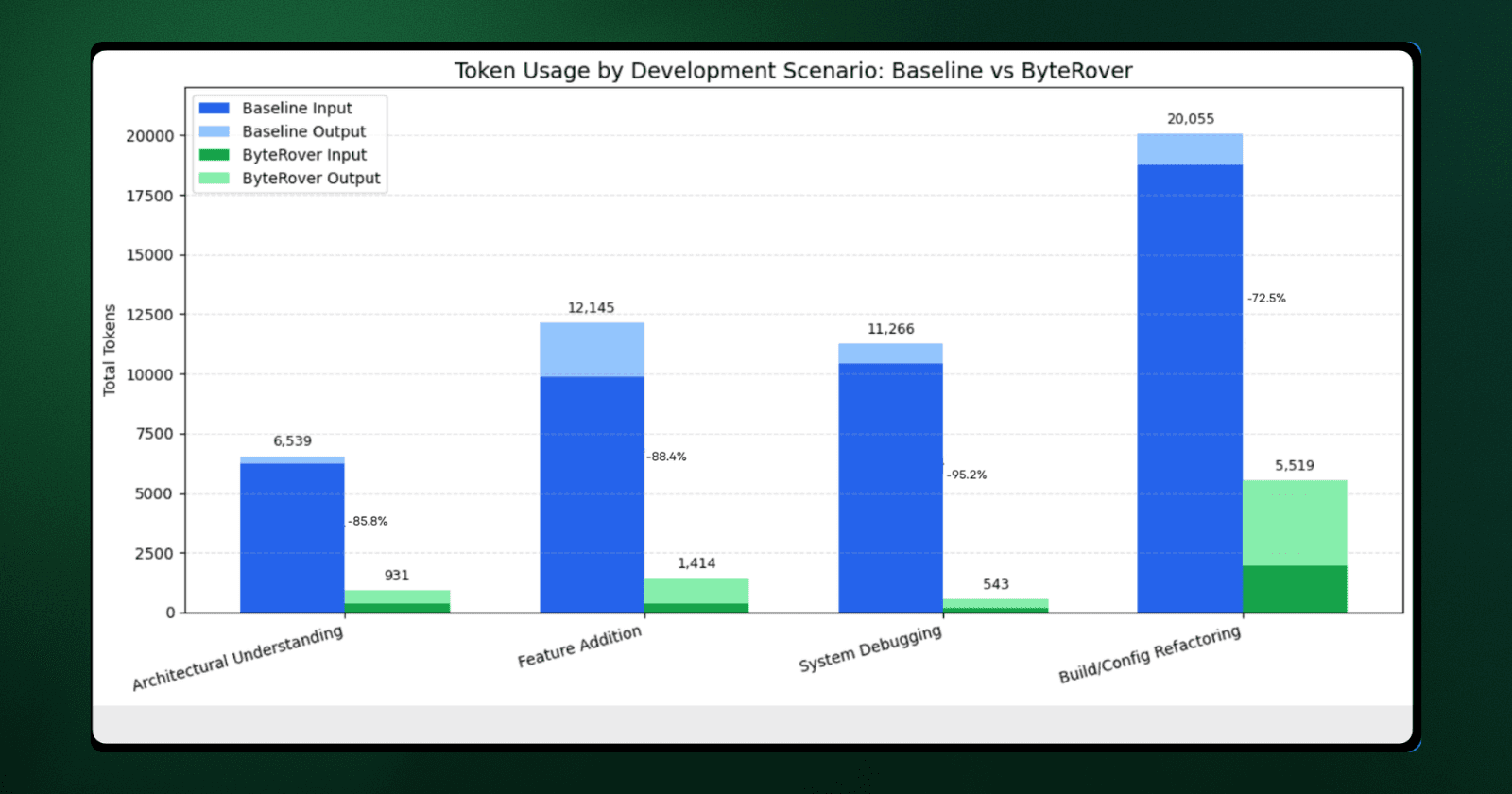
Architecture Exploration | Where is server component rendering logic? | 6,539 | 931 | 5,608 fewer | $0.014 | 85.8% |
Feature Implementation | How does middleware rewriting work? Where do I add geolocation support? | 12,145 | 1,414 | 10,731 fewer | $0.047 | 88.4% |
System Debugging | How is router cache invalidation structured? | 11,266 | 543 | 10,723 fewer | $0.037 | 95.2% |
Build Configuration | Show webpack integration and loader setup for markdown files | 20,055 | 5,519 | 14,536 fewer | $0.017 | 72.5% |
Cost calculation: (Input tokens × $3/M) + (Output tokens × $15/M) using Claude 4.5 Sonnet pricing
The chart below visualizes the differences:
System Debugging (-95.2%): This category saw the sharpest reduction. Instead of loading five files (>10k tokens) to trace cache logic, ByteRover retrieved a concise 202-token structural summary followed by a targeted lookup.
Feature Implementation (-88.4%): By accessing a memory-based description of the middleware pipeline, the agent identified logic insertion points without needing to parse the full source code.
Architectural Queries (-85.8%): Structural questions were answered via direct memory retrieval, completely avoiding the overhead of loading implementation details.
Build Configuration: While still the most expensive category due to Webpack's complex, multi-layered nature, input tokens dropped significantly, from 18,743 to 1,949.
The Bottom Line The broader the query's scope, the more efficient the memory layer becomes. Traditional file-based context forces the AI to ingest massive amounts of code just to understand how different components relate. Persistent memory removes this overhead. When scaled across a team of developers, these per-query efficiencies translate into significant reductions in latency and API costs.
Scale Economics: Team Cost at Runtime
Our tests have focused on individual queries so far. However, in a real-world setting, context handoffs don’t happen in isolation. They occur repeatedly throughout the day, across different developers, and often target the same areas of the codebase.
This section examines how these per-query differences add up when a team repeatedly queries the same patterns.
Baseline Assumptions
To keep the comparison realistic, we used a simple, consistent workload model:
~20 context queries per developer per day.
~22 working days per month.
The same model and pricing used in the previous sections.
The same four query types, repeated naturally during development.
While the exact numbers will vary from team to team, the underlying cost trend remains the same.
Monthly Cost by Team Size
Team Size | File-Based Context | Memory-Based Context | Difference |
|---|---|---|---|
5 devs | ~$114 | ~$50 | ~$64 |
10 devs | ~$229 | ~$101 | ~$128 |
25 devs | ~$572 | ~$252 | ~$320 |
50 devs | ~$1,144 | ~$504 | ~$640 |
Cost calculation:
Monthly cost = (Team size × 20 queries/day × 22 working days) × Average cost per query.
File-based avg: $0.052/query
ByteRover avg: $0.0229/query using (Input tokens × $3/M) + (Output tokens × $15/M).
Token reduction is 83%, but API cost savings are 56% because output tokens (which cost 5× more) increased slightly as agents spend less time processing context and more time generating detailed answers.
These figures reflect API token costs only and exclude ByteRover subscription fees.
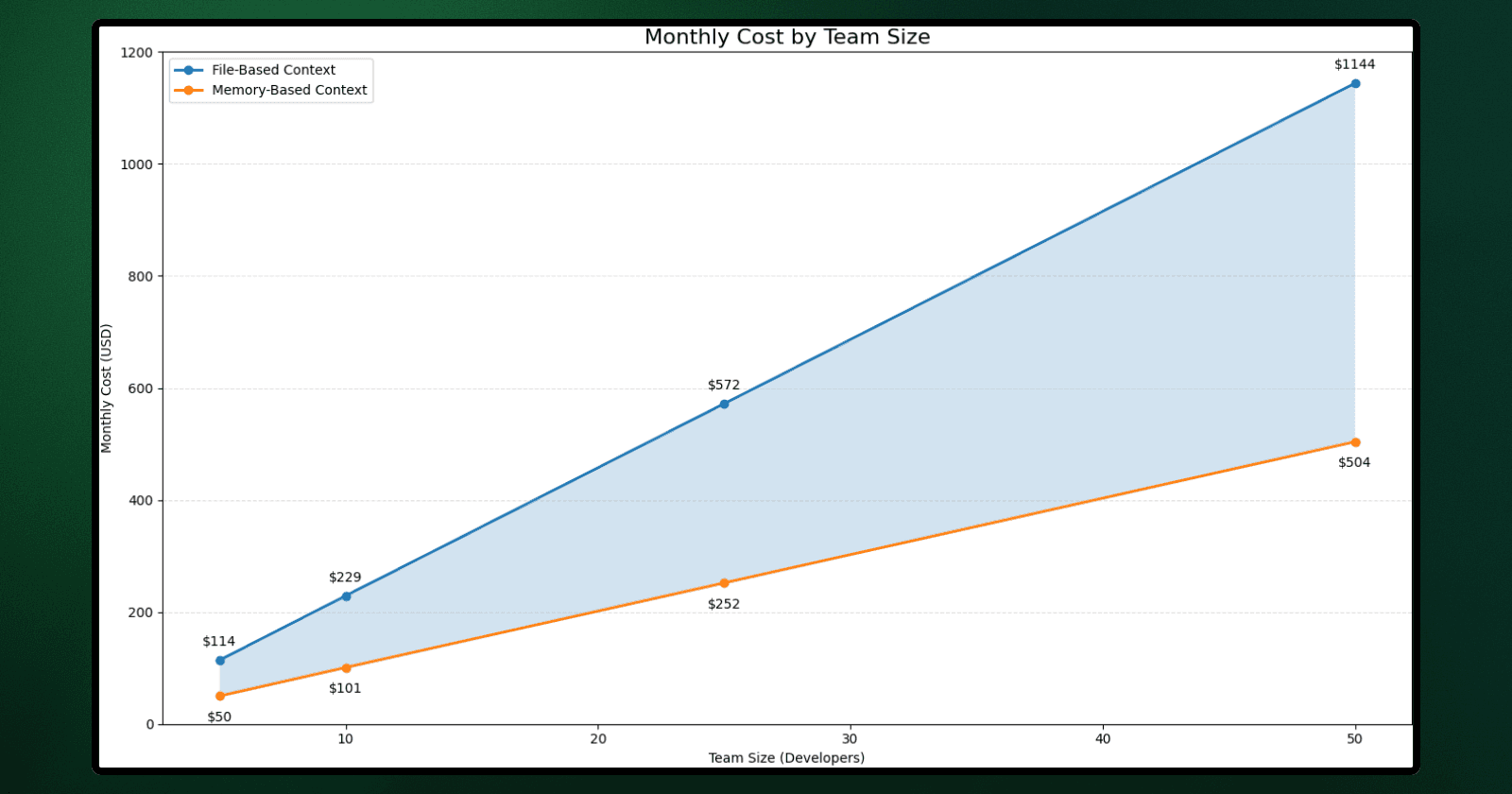
Two key factors drive cost:
Token costs scale linearly with usage: More developers mean more queries, which leads to more repeated context reconstruction.
Context preparation scales differently: With a memory layer, once the architectural context exists, that same knowledge is reused across queries and across the team.
Why This Compounds Over Time
In file-based workflows, every query is treated as a "cold start." Even if a developer queries the same subsystem an hour later, the agent re-processes the same raw files.
In memory-based workflows, the cost of understanding the system is paid once and then reused. This difference manifests in three ways:
Fewer massive context loads.
Less variance in response time.
More predictable query behavior across the team.
While the dollar savings for a single developer might seem modest initially, they compound rapidly across a team. The takeaway isn’t just about optimizing for token cost. Once a team relies heavily on AI-assisted workflows, how context is rebuilt becomes more important than how prompts are phrased.
When This Matters (and When It Doesn't)
Our benchmark shows measurable token reduction, but not every team will see the same ROI. Context cost depends on codebase size, team structure, and how often developers need to reconstruct understanding from scratch.
Here is where domain-structured context provides leverage and where file-based workflows remain sufficient.
When File-Based Context Works Fine
Small codebases (<100 files): Tagging 3–4 files is fast enough. The overhead of compressing context might outweigh the savings.
Low query volume (<5 queries/day): For a 5-person team, baseline costs stay under $30/month. The optimization doesn't justify the setup effort.
Solo developers on familiar code: Context reconstruction is rare when the developer already knows the architecture inside out.
When ByteRover Shows ROI
Developer rotation: When a second or third developer picks up a task, they reuse shared architectural knowledge instead of reconstructing it independently. Token reduction averages 83.2% across handoffs.
Large codebases (200,000+ LOC): Even experienced developers don't always know exactly which files to tag. Memory-based context retrieves the structure first, then drills down selectively.
High query volume (20+ queries/day): A 5-person team running 20 queries/day costs ~$115/month baseline ($1,380 annually). A 56% reduction saves ~$773/year. This is a meaningful amount for budget-conscious teams.
Teams at scale (25+ developers): At 25 developers, baseline costs can reach $6,900 annually. At 50+ developers, token optimization becomes a core infrastructure requirement, not just a cost-saving measure.
What the Benchmark Doesn't Capture
Onboarding speed: New developers can pull architectural context immediately instead of waiting for teammates or digging through PRs.
Response consistency: Queries return consistent answers across the team because everyone draws from shared memories, not individual file selections.
Knowledge retention: When senior developers leave, their curated context remains accessible to the team.
These benefits compound over time, even if they don't show up in a simple per-query token count.
Closing
This article focused on a simple question: What happens when context is rebuilt from scratch for each query compared to reusing it across sessions?
We measured token usage, cost, response time, and retrieval precision, then applied these results to different team sizes to identify the tipping point. Using the same codebase, the same queries, and the same model, the difference came down entirely to how context was managed.
File-based workflows treat every question as a cold start. Memory-based workflows treat understanding as a persistent asset.
The takeaway isn’t that one approach replaces the other. It’s that once teams rely heavily on AI to navigate complex systems, context becomes an asset, and managing that asset efficiently is critical.
If your team is hitting context limits or watching token costs climb as your codebase grows, ByteRover is worth a look.
Try ByteRover
Full setup guide here