Article
Maintain >90% Retrieval Precision with 83% Token Reduction: File-based vs ByteRover
In our previous experiment, we compared a file-based memory setup with ByteRover and observed an 83% reduction in token usage. This showed that linear, file-based context is costly, and that structured retrieval can significantly reduce prompt size.
Token reduction, however, is only part of the equation. Lower cost matters only if the agent continues to retrieve the right information. In this experiment, we shift focus from token savings to retrieval precision, evaluating how accurately relevant context is surfaced when using ByteRover compared to a file-based approach.
We ran a controlled benchmark on the Next.js framework repository (2,600 files, ~487k LOC). We compared manual file tagging in Cursor against ByteRover's intent-based retrieval across ten development queries spanning four categories:
Cross-module features: Logic is spread across several files, where keyword searches often bring up coordination or wrapper code instead of the main implementation.
Single-module features: Logic concentrated in one or two well-known files, where file boundaries are clear, and retrieval is straightforward.
Build infrastructure: Build tools and config files spread across many locations with no obvious starting point. Example: "How does the build system work?" retrieves webpack config, babel settings, plugin files, and loader utilities, all in separate places.
Framework pattern comparison: Questions that require separating older patterns from newer ones without pulling in unrelated infrastructure. Example: "How do API routes work?" retrieves both the old system files and the new system files, making it unclear which one is actually used today.
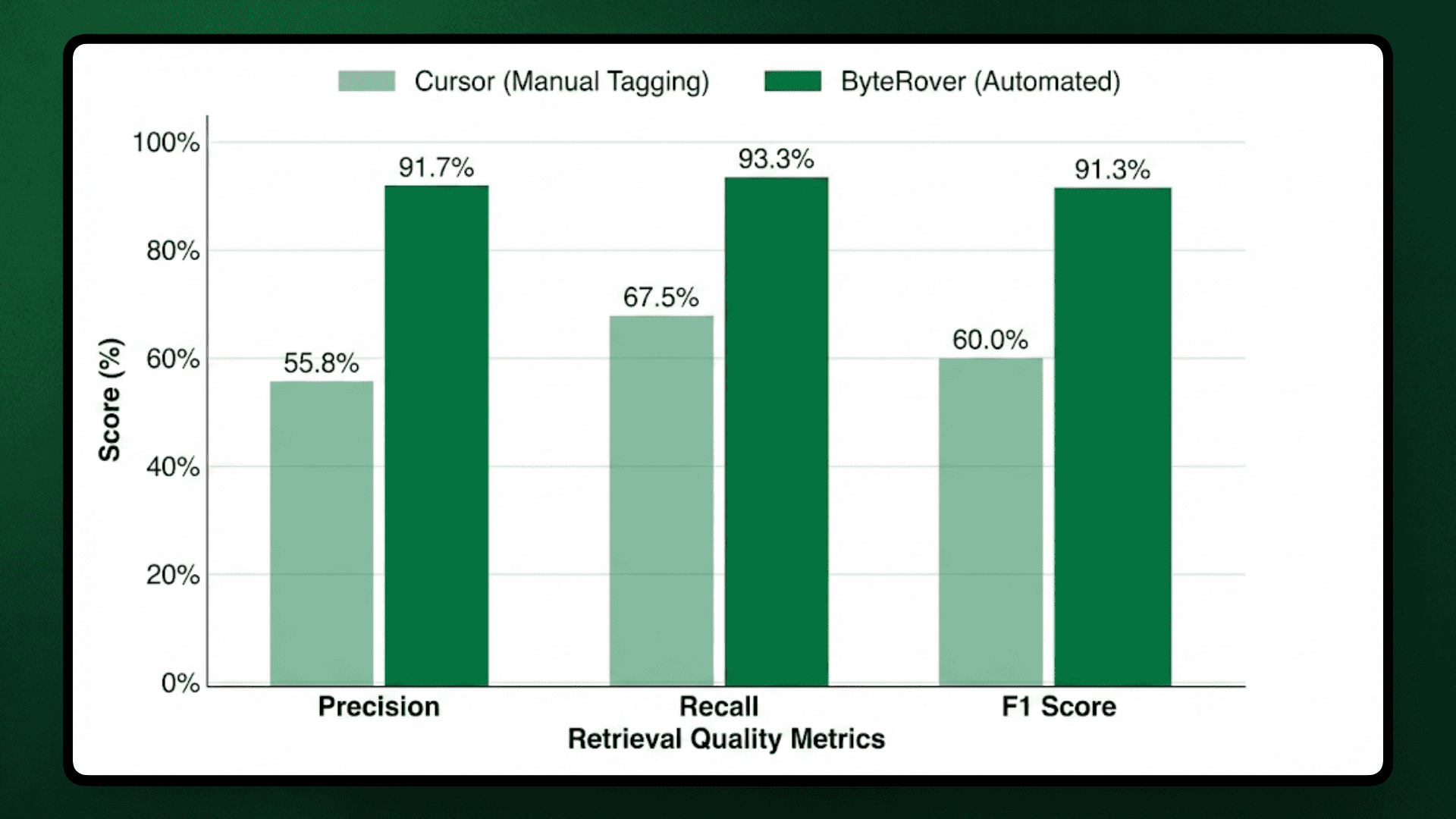
With this test, we observed that ByteRover achieved 91.3% average F1 accuracy compared to Cursor's 60.0%, a 31-percentage-point improvement.
This difference in precision comes from how each method finds the relevant context. We measured retrieval accuracy across two approaches:
Approach 1: Manual File Tagging - Developers use @ mentions to manually selecting specific files in Cursor.
Approach 2: ByteRover Memory Layer - Persistent architectural knowledge stored via brv curate (see our token efficiency benchmark for detailed memory layer mechanics) and retrieved automatically through brv query.
Note on Test Scope: This benchmark compares manual file tagging versus automated retrieval. We excluded the "no files tagged" scenario because this benchmark focuses on precision and reasoning accuracy, not token usage. For context: omitting file selection in Cursor increases token usage by approximately 24% on average based on our token efficiency analysis, where untagged queries averaged 16,540 tokens compared to 12,501 tokens with manual tagging.
Before we look at the test results, let's understand why we're focusing on precision and why it is important for the quality of answers.
Why Precision Matters
When an AI coding agent answers a question like “How does server component rendering work?”, the result depends on which files are included. If most of the retrieved files are generic server utilities rather than rendering logic, the model spends its effort sorting through unrelated code instead of explaining the actual implementation.
In a real-world scenario, low retrieval precision causes a few recurring problems:
Mixing unrelated implementations: When retrieval includes both legacy and current code paths, responses blend multiple approaches without making it clear which one is active. This leaves developers unsure which pattern to follow.
Pulling in test and support code: Test helpers, mocks, and error-handling utilities are often retrieved alongside production logic. When that happens, responses describe test behavior as if it were part of the runtime system.
Relying on documentation instead of code: Documentation and README files sometimes replace implementation files in the retrieved context. The result is a high-level explanation that doesn’t reflect how the feature actually works in code.
These issues don’t always show up in recall-focused metrics. A system can retrieve many relevant files and still produce weak answers if most of the context is not directly tied to the implementation. The rest of this benchmark measures how often that happens and how it affects task completion across real development queries.
Ground Truth
To evaluate retrieval accuracy, we defined a fixed set of ground truth files for each query representing the minimum implementation context required to answer correctly.
Ground truth came from manual Next.js codebase analysis. Files were included if they contained primary implementation logic, coordinated multi-component execution, or defined runtime entry points. Test files, documentation, type definitions without behavior, and deprecated code were excluded.
Ground Truth Mapping
Category | Query | Ground Truth Files | Why These Files |
|---|---|---|---|
Cross-Module Features | Q1: Where is the server component logic implemented? |
| Files that convert React components to HTML on the server, build the component tree structure, handle data sent to browsers, and execute server actions |
Cross-Module Features | Q3: How is router cache invalidation structured? |
| Files that store cached pages, coordinate routing updates, trigger cache refreshes, and sync changes between server and browser |
Cross-Module Features | Q8: Where is ISR (Incremental Static Regeneration) revalidation logic implemented? |
| Files that manage the cache storage layer, trigger regeneration of static pages, and propagate updates to clients |
Single-Module Features | Q5: How does Next.js image optimization work? Show the Image component and server-side optimizer implementation. |
| React component that developers use in their code + server pipeline that processes and optimizes images |
Single-Module Features | Q6: Where is the next/font loader implementation? How does it process Google and local fonts? |
| Webpack loader entry point that processes font files, compiler transform written in Rust, and local font file handler |
Single-Module Features | Q10: How does Next.js generate and serve metadata files (sitemap, robots, manifest)? |
| Files that convert metadata objects into actual XML/JSON/TXT files, detect metadata routes, and define the API structure |
Build Infrastructure | Q4: I need to refactor the webpack configuration to support custom loaders for markdown files in the app directory. Show me the current webpack integration, where loader configuration is handled, and how the app directory build process works. |
| Main webpack configuration file + example loader showing the pattern for app directory integration |
Build Infrastructure | Q9: How does Turbopack integration work in Next.js? Show build and dev server setup. |
| Production build orchestration logic, bundler selection between webpack/turbopack, and dev server initialization |
Framework Pattern Comparison | Q2: How does middleware rewriting work? Where do I add geolocation support? |
| Middleware rewrite API surface, request object with geolocation access, and underlying infrastructure package |
Framework Pattern Comparison | Q7: How are API routes (Pages Router) handled vs Route Handlers (App Router)? |
| File that executes Pages Router API routes + file that handles App Router route handlers + legacy routing behavior |
Retrieval results were evaluated using standard information retrieval metrics:
Precision (percentage of retrieved files in ground truth)
Recall (percentage of ground truth files retrieved)
F1 score (balanced measure combining both). Perfect scores are required for retrieving all ground truth files without irrelevant additions.
Context Precision Test
Retrieval accuracy depends on whether the agent identifies core implementation files or includes irrelevant context. We executed each query with both systems (Cursor & ByteRover) and compared retrieved files against ground truth to measure precision, recall, and F1 scores.
Aggregate Results
Metric | Cursor (Manual Tagging) | ByteRover (Automated) | Improvement |
|---|---|---|---|
Average Precision | 55.8% | 91.7% | +35.9pp |
Average Recall | 67.5% | 93.3% | +25.8pp |
Average F1 Score | 60.0% | 91.3% | +31.3pp |
ByteRover achieved complete retrieval (100% F1) on seven queries compared to Cursor's single perfect score, but the performance gap came from consistent noise in manual tagging, where developers included adjacent files, documentation, or test utilities that appeared relevant through keyword matching but lacked core implementation logic.
Precision vs Recall Distribution
The aggregate results highlight ByteRover's advantage but looking at how precision and recall balance across queries shows where each method performs well or struggles.
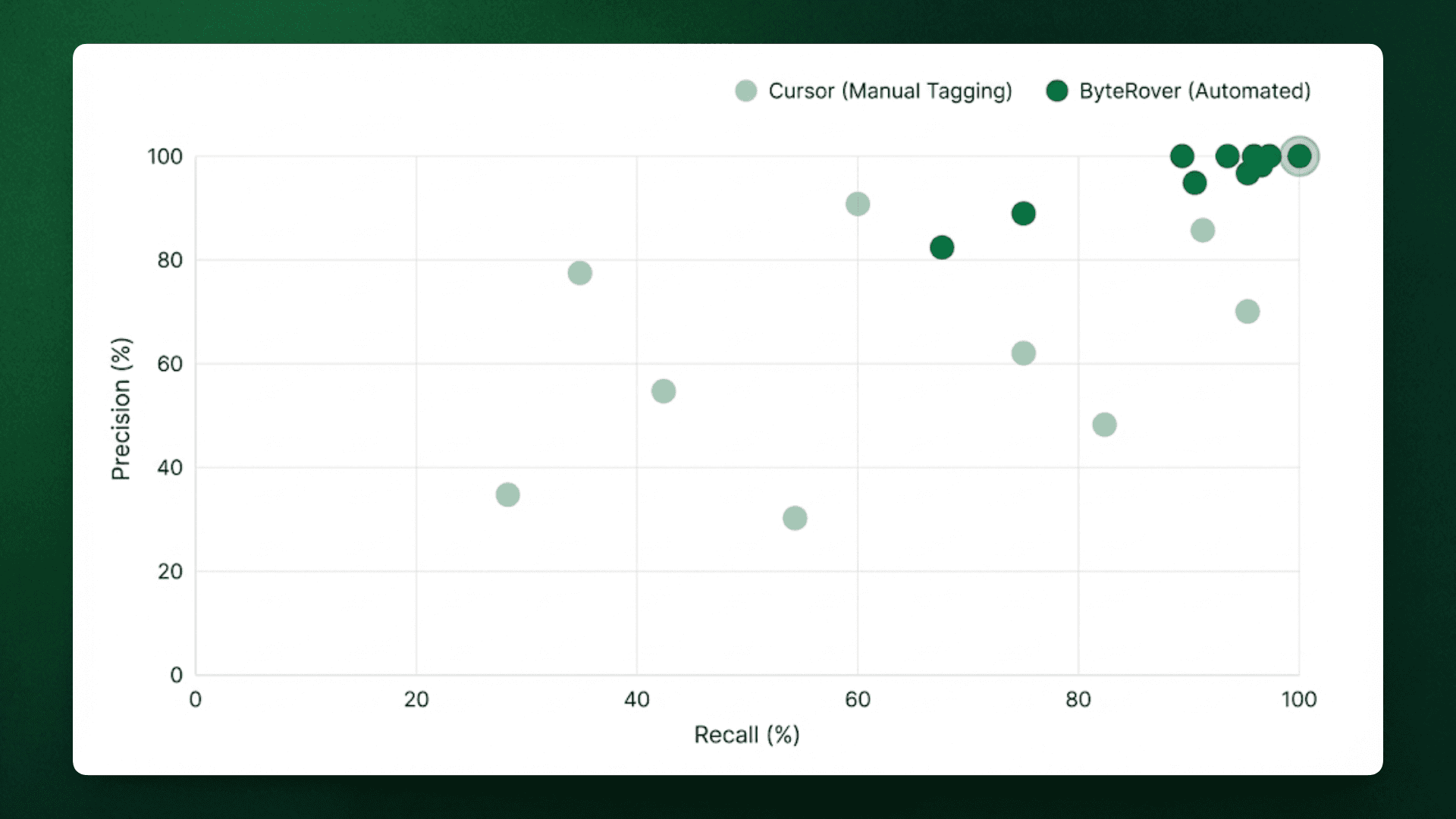
Cursor's queries scattered across the precision-recall space. Q1 and Q8 fell below 35% precision due to heavy noise, while Q4 and Q6 achieved high precision (75-100%) only on concentrated implementations. ByteRover maintained consistently high precision (≥80% on 9/10 queries) and high recall (≥80% on 8/10 queries). Memory-based retrieval maintained both, sacrificing precision to maximize recall. The tight clustering near (100%, 100%) shows predictable performance, while Cursor's variance indicates unpredictable results depending on whether developers correctly guessed file locations.
Per-Category Breakdown
We also broke down the results by category to identify where manual tagging introduced noise and where automated retrieval maintained precision across varying implementation patterns.
Cross-Module Features:
Manual tagging was least reliable for features spread across multiple files. In those cases, keyword search pulled in the nearby infrastructure files rather than the core implementation.
Query | Cursor F1 | ByteRover F1 | Gap |
|---|---|---|---|
Q1: Server component logic | 25.0% | 100.0% | +75.0pp |
Q3: Router cache invalidation | 57.1% | 100.0% | +42.9pp |
Q8: ISR revalidation | 28.6% | 100.0% | +71.4pp |
Category Average | 36.9% | 100.0% | +63.1pp |
In these cases, Cursor often retrieved generic server setup files (such as base-server.ts or next-server.ts) or cache interfaces, while missing the files where rendering, revalidation, or cache updates actually occur.
Single-Module Features:
When a feature was in a few clearly named files, manual tagging worked well and was similar to automated retrieval.
Query | Cursor F1 | ByteRover F1 | Gap |
|---|---|---|---|
Q5: Image optimization | 66.7% | 100.0% | +33.3pp |
Q6: next/font loader | 85.7% | 100.0% | +14.3pp |
Q10: Metadata file generation | 100.0% | 100.0% | 0.0pp |
Category Average | 84.1% | 100.0% | +15.9pp |
These queries had obvious entry points, so both approaches tended to retrieve the same implementation files with little noise.
Build Infrastructure:
Build tooling showed mixed results, where even curated memory couldn't always narrow the scope. It happened because the logic is spread across configuration files, loaders, and helper utilities.
Query | Cursor F1 | ByteRover F1 | Gap |
|---|---|---|---|
Q4: Webpack configuration | 80.0% | 66.7% | -13.3pp |
Q9: Turbopack integration | 66.7% | 66.7% | 0.0pp |
Category Average | 73.4% | 66.7% | -6.7pp |
In these cases, it was difficult to separate the main configuration from supporting code, since build files often reference many utilities without clearly indicating which parts are essential. Like, webpack configuration queries have unclear boundaries between core config and supporting utilities.
Framework Pattern Comparison:
These queries required knowing which implementation applies today, not just which files mention the feature.
Query | Cursor F1 | ByteRover F1 | Gap |
|---|---|---|---|
Q2: Middleware + geolocation | 33.3% | 100.0% | +66.7pp |
Q7: API routes vs Route Handlers | 57.1% | 80.0% | +22.9pp |
Category Average | 45.2% | 90.0% | +44.8pp |
Manual tagging often retrieved files from both older and newer implementations, along with shared server code, which led to mixed explanations instead of a clear description of the current pattern.
In all categories, the gap got bigger when queries needed an understanding of relationships between files instead of just matching keywords. Cross-module features and framework comparisons had the biggest precision gaps (63pp and 45pp, respectively) because manual tagging couldn't distinguish between core logic and supporting infrastructure. Single-module features did best for both methods since clear file names made selection easy. The build infrastructure category was tough for both systems, showing the natural confusion in configuration files that reference many utilities without clear limits.
Retrieval Examples
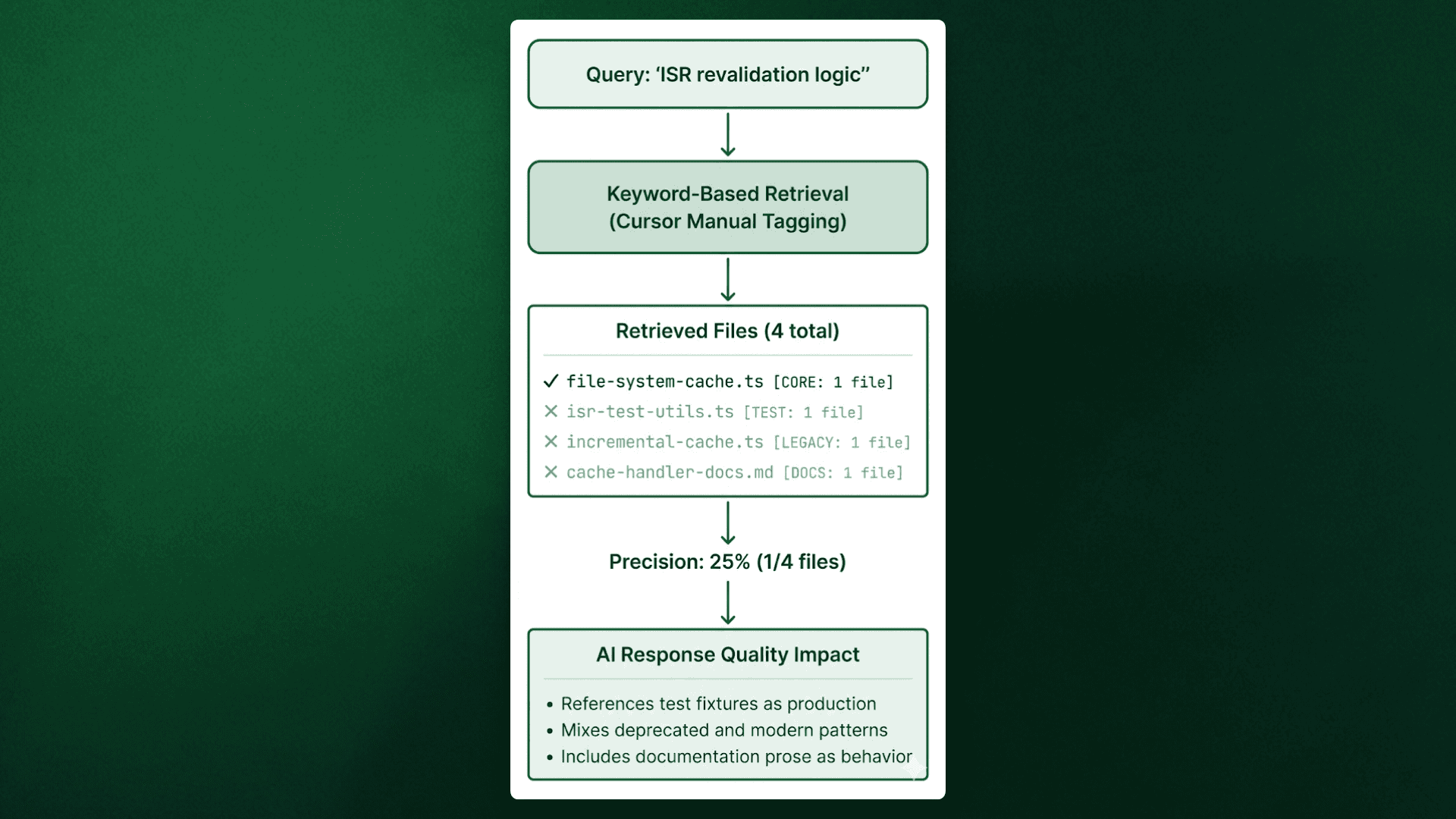
Beyond the per-query scores, we examined how each system behaved during execution. The example below uses Q8 (ISR revalidation) to illustrate the difference between keyword-based file selection and memory-based retrieval.
Q8: ISR Revalidation Logic
Query: "Where is ISR (Incremental Static Regeneration) revalidation logic implemented?"
Cursor Approach: File Search with Manual Tagging
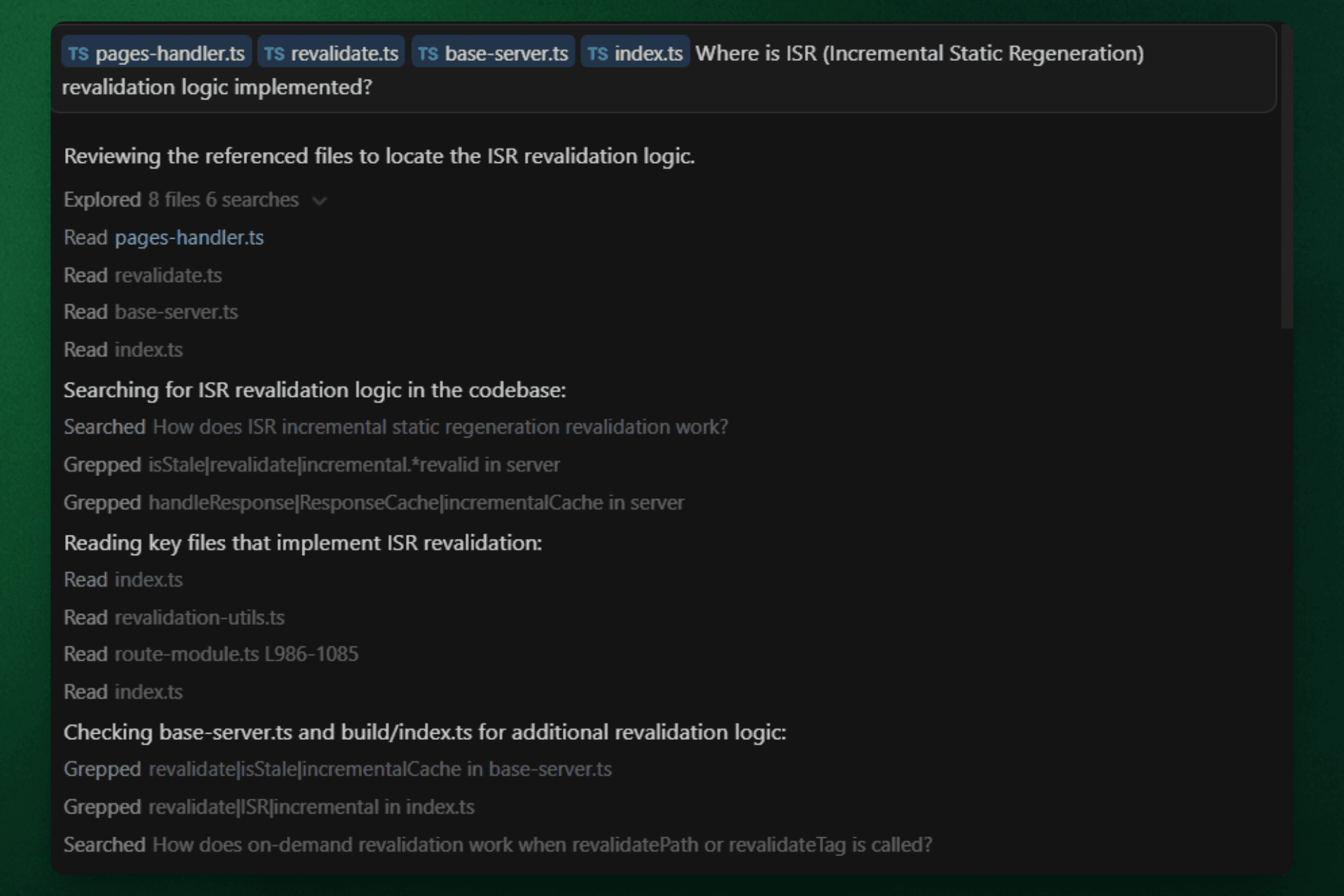
Cursor executed a multi-step search process:
Read 4 initial tagged files (pages-handler.ts, revalidate.ts, base-server.ts, index.ts)
Performed 6 codebase searches using keywords like "isStale | revalidate | incremental" and "handleResponse | ResponseCache | incrementalCache"
Read 4 additional files (index.ts, revalidation-utils.ts, route-module.ts, index.ts)
Checked base-server.ts and build/index.ts for additional context
Result: Retrieved 2 correct files (pages-handler.ts, revalidate.ts) but included base-server.ts and build/index.ts (orchestration layers, not core ISR implementation). Missing file-system-cache.ts despite extensive searches. Precision: 50% on tagged files.
ByteRover Approach: Memory Retrieval
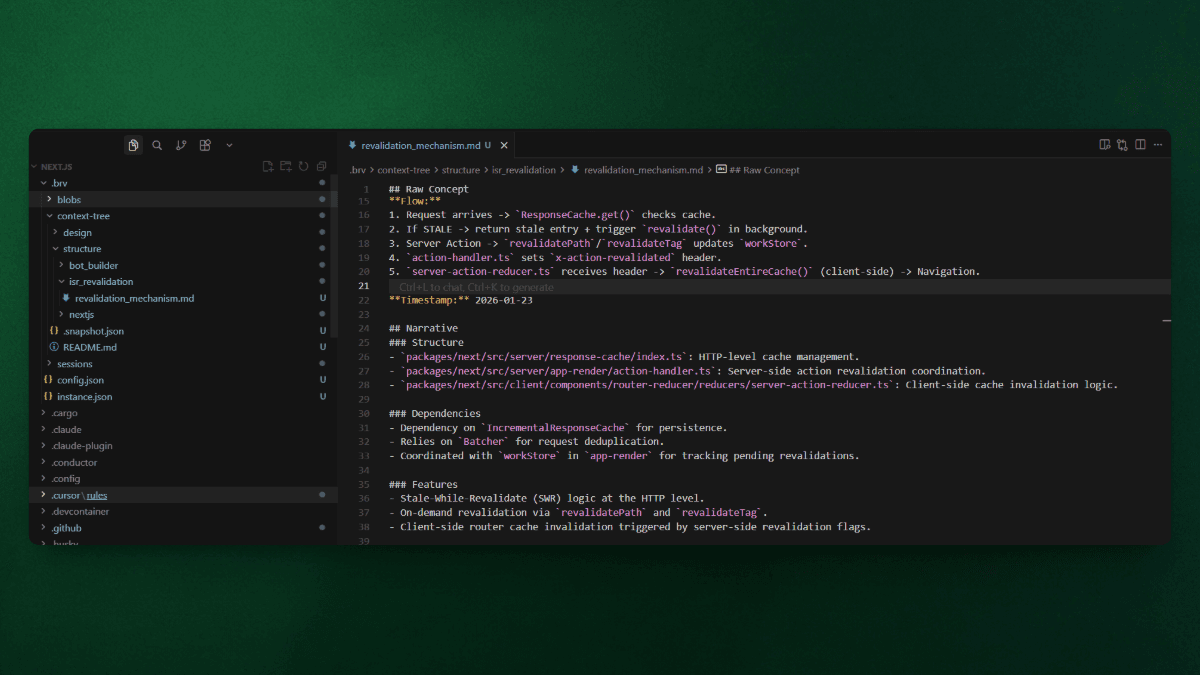
Retrieved from curated memory (no codebase search required):
index.ts(IncrementalCache core logic)action-handler.ts(executeRevalidates trigger)server-action-reducer.ts(client-side cache eviction)
Result: All 3 files directly implement ISR revalidation across the complete flow: cache management → server-side triggers → client-side synchronization. Precision: 100%
Retrieval Source Comparison
System | Files Retrieved | Search Operations | Source | Precision |
|---|---|---|---|---|
Cursor | 4 tagged files | 6 keyword searches + 8 file reads | Fresh codebase search | 50% (2/4 correct) |
ByteRover | 3 files | 0 searches | Curated memory | 100% (3/3 correct) |
ByteRover's memory layer was encoded during brv curate that ISR revalidation spans three implementation boundaries (cache storage, server action coordination, client state updates), eliminating the need for keyword-based searches that surface orchestration files matching "revalidate" terminology but lacking implementation logic.
Our Interpretation
Manual tagging failed on queries requiring cross-module understanding because developers relied on keyword search, which retrieved adjacent files: wrappers, utilities, tests, alongside implementation. ByteRover's one-time curation encodes structural patterns (which files implement features, how modules interact), eliminating the need to rediscover architecture per query.
Manual selection worked well when the required files were well-known entry points (metadata generation, font loader). The gap emerged when implementation boundaries weren't obvious from file names alone.
Task Completion Test
Retrieval precision determines whether AI models receive implementation files or noise, but the metric that matters for development teams is task completion, whether the final output actually solves the problem. We evaluated both systems by verifying their responses against query requirements using binary scoring, where answers either fully addressed the architectural question or failed to provide actionable implementation guidance.
Task Completion Results
Metric | Cursor | ByteRover |
|---|---|---|
Correct Answers | 9/10 (90%) | 10/10 (100%) |
Failed Query | Q1 (Server component logic) | None |
ByteRover achieved complete task success across all queries, while Cursor failed on Q1 due to retrieval precision dropping to 25% F1. The response mixed correct files (app-render.tsx) with auxiliary modules (base-server.ts, next-server.ts, server-utils.ts) that matched the "server" keyword but lacked React Server Component rendering implementation, producing verbose explanations that covered HTTP server initialization instead of RSC architecture.
Correlation Between Retrieval Precision and Answer Quality
Query | Cursor F1 | Cursor Answer | ByteRover F1 | ByteRover Answer |
|---|---|---|---|---|
Q1 | 25.0% | ❌ Incorrect (mixed auxiliary files) | 100.0% | ✓ Correct |
Q2 | 33.3% | ✓ Correct (despite low precision) | 100.0% | ✓ Correct |
Q3 | 57.1% | ✓ Correct | 100.0% | ✓ Correct |
Q4 | 80.0% | ✓ Correct | 66.7% | ✓ Correct |
Q5 | 66.7% | ✓ Correct | 100.0% | ✓ Correct |
Q6 | 85.7% | ✓ Correct | 100.0% | ✓ Correct |
Q7 | 57.1% | ✓ Correct | 80.0% | ✓ Correct |
Q8 | 28.6% | ✓ Correct | 100.0% | ✓ Correct |
Q9 | 66.7% | ✓ Correct | 66.7% | ✓ Correct |
Q10 | 100.0% | ✓ Correct | 100.0% | ✓ Correct |
Cursor's single failure occurred at 25% F1 (Q1). In this case, three noise files (base-server.ts, next-server.ts, server-utils.ts) overwhelmed one correct file (app-render.tsx), causing the AI to explain server initialization instead of React rendering.
When Cursor's F1 stayed above 60%, it answered correctly despite including extra files. The AI successfully filtered noise in 9 out of 10 queries, but failed when the wrong files outnumbered the right ones.
ByteRover maintained correct answers even when retrieval wasn't perfect. At 66.7% F1 (Q4, Q9), ByteRover missed some relevant files but didn't include wrong ones. This matters because missing context produces incomplete answers, while wrong context produces incorrect answers. ByteRover's 91.7% average precision meant responses focused on actual implementation, while Cursor's 60.0% precision required filtering irrelevant files, a task the AI handled well except when noise dominated.
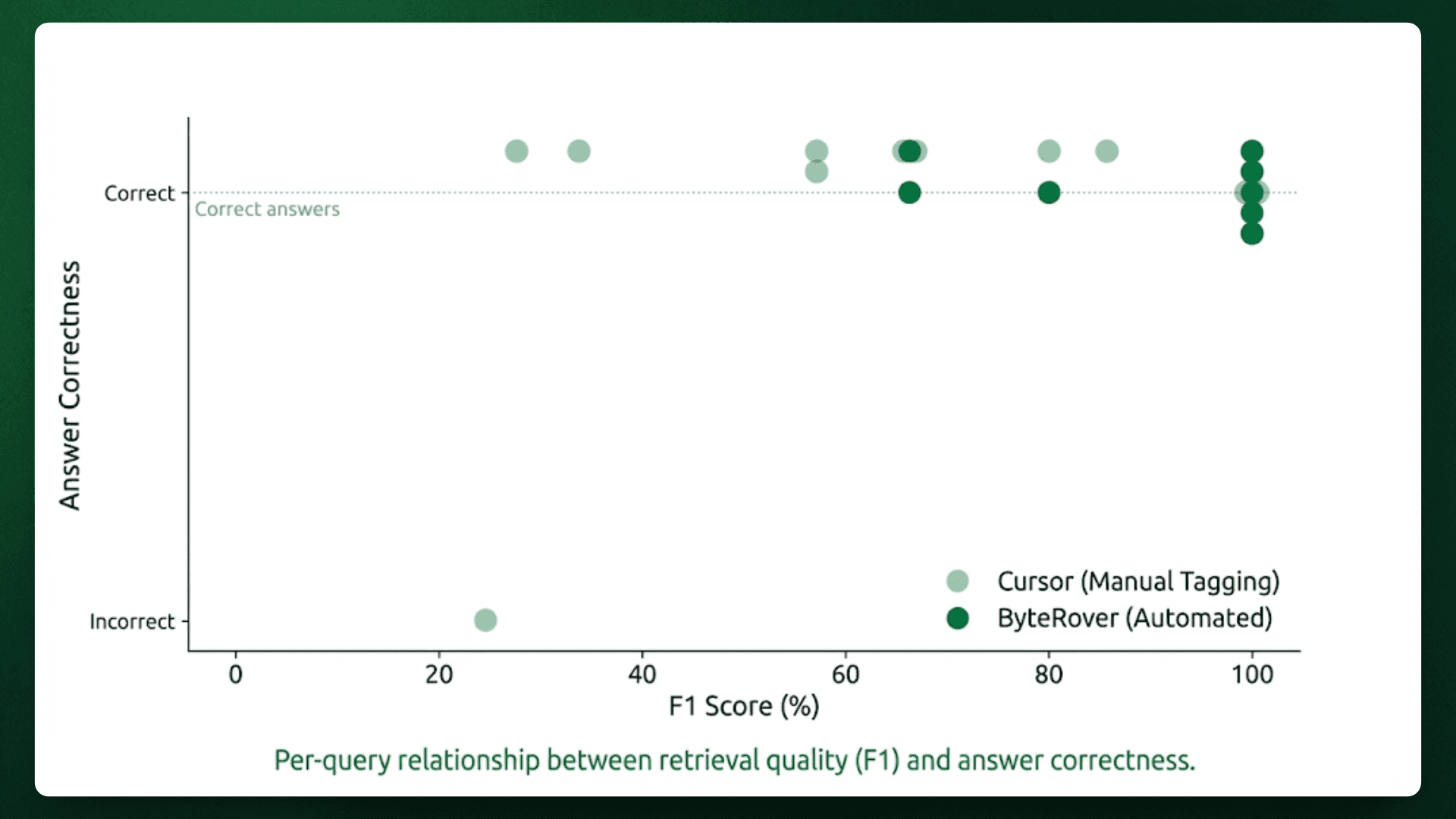
Scatter plot showing F1 Score (x-axis) vs Answer Correctness (y-axis, binary 0/1) for both systems. Cursor shows a single failure point at 25% F1, ByteRover shows a perfect horizontal line at correctness=1.0 across all F1 ranges.
False Positive Impact on Response Quality
Cursor's false positives clustered into three categories that degraded answer quality in measurable ways:
Noise Type | Example (Q1) | Impact on Response |
|---|---|---|
Auxiliary modules | server-action-request-meta.ts (action parsing utilities) | AI explained how server actions work instead of how components render |
Infrastructure wrappers | base-server.ts, next-server.ts | Response covered HTTP server setup instead of React component rendering |
Utility files | next-flight-css-loader.ts (CSS asset handling) | Added CSS loading mechanics unrelated to component rendering |
ByteRover eliminated these categories through architectural encoding during curation, where the memory layer compressed knowledge about which files contain active implementation versus supporting infrastructure.
This architectural encoding also enables reusing context across related queries instead of rescanning the codebase each time.
Redundant Context Fetching
In addition to retrieval precision and reasoning accuracy, we evaluated how each system handles repeated architectural context across related queries.
Developers often ask related questions in sequence. Someone exploring cache invalidation might ask, "How is router cache structured?" followed by "Where does ISR revalidation trigger?" Traditional retrieval approaches treat each query independently, re-scanning the codebase and retrieving overlapping files multiple times. ByteRover's memory layer recognizes architectural relationships and reuses context across related queries.
We measured redundancy by analyzing query pairs that share implementation context, cases where the second query requires files already retrieved for the first.
Query Pair Analysis
Query Pair | Shared Implementation | Cursor Behavior | ByteRover Behavior |
|---|---|---|---|
Q3 (Router cache) + Q8 (ISR revalidation) | file-system-cache.ts, incremental-cache/index.ts | Retrieved separately for each query (2x fetch) | Retrieved once for Q3, reused from memory for Q8 (1x fetch) |
Q1 (Server components) + Q7 (API routes) | next-server.ts, app-route/module.ts | Tagged independently per query (2x fetch) | Cached from Q1, referenced in Q7 without re-retrieval (1x fetch) |
Q2 (Middleware) + Q3 (Cache invalidation) | router-reducer.ts | Manual re-selection required (2x fetch) | Reused from Q2 memory (1x fetch) |
Across these three query pairs, Cursor retrieved six files twice (12 total retrievals) because manual tagging requires developers to identify relevant files for each question independently. ByteRover retrieved those same six files once (6 total retrievals), reducing redundant context fetching by 50% through memory-based reuse.
Total Redundant Retrievals:
Cursor: 6 files × 2 retrievals = 12 total
ByteRover: 6 files × 1 retrieval = 6 total
Redundancy eliminated: 50%
This 50% reduction compounds during real development sessions where engineers ask 15-20 related questions while debugging a feature or exploring architectural patterns. For the token usage implications of this redundancy, including concrete cost calculations across team sizes, see our previous benchmark on token efficiency.
Reducing redundancy limits how often the same context is loaded, but it does not guarantee that the retrieved context is accurate. That’s where Precision Matters.
How Precision Affects Answer Quality
After looking at the results for each query and how often tasks were completed, we can see patterns showing how precision levels affect whether answers succeed or fail. The three failure patterns described earlier (mixing unrelated implementations, pulling in test code, and relying on documentation) happened differently based on how much precision decreased.
Q7 (API routes vs Route Handlers) demonstrated this directly. Cursor retrieved both api-resolver.ts (Pages Router) and app-route/module.ts (App Router), but also included base-server.ts, which predates both routing systems. The response mixed three architectural patterns without clarifying which applies to modern development.
Q8 (ISR revalidation) showed another failure mode where Cursor retrieved handle-isr-error.tsx alongside file-system-cache.ts, causing the model to reference test fixtures as production implementation.
ByteRover's memory layer filtered these categories during brv curate by encoding which files contain active implementation versus supporting infrastructure, deprecated patterns, or test utilities. The correlation between precision and task completion quantifies this relationship:
Precision Range | Cursor Success Rate | ByteRover Success Rate | Impact |
|---|---|---|---|
Below 30% F1 | 0/1 (0%) | N/A | Noise overwhelms signal, response fails |
30-60% F1 | 3/3 (100%) | N/A | Correct but verbose, covers unnecessary subsystems |
60-85% F1 | 5/5 (100%) | 3/3 (100%) | Correct with moderate noise |
Above 85% F1 | 1/1 (100%) | 7/7 (100%) | Focused response on core implementation |
Cursor's single failure occurred at 25% F1 (Q1), where three noise files (base-server.ts, next-server.ts, server-utils.ts) overwhelmed one correct file (app-render.tsx), producing a response about HTTP server initialization instead of React Server Component rendering. ByteRover maintained precision above 80% on nine queries by encoding architectural relationships rather than matching keywords.
Limitations
This benchmark tested how accurately information was retrieved for ten architectural questions on Next.js. Several limitations affect how broadly these results can be applied:
Query scope: Ten tasks captured common development patterns but missed edge cases like historical reasoning, cross-repository analysis, or documentation-heavy queries.
Ground truth subjectivity: We defined ground truth through manual codebase analysis. Another engineer might include more context files; the 91.3% F1 score reflects alignment with our criteria, not absolute correctness.
Codebase specificity: Next.js is a modular framework with clear boundaries. ByteRover performed better on questions needing understanding across modules. Monolithic codebases with tightly connected logic might show different precision differences.
Static snapshot: Testing used a fixed repository state, ignoring how shared memory evolves, how teams collaborate on curation, or how retrieval adapts as architectures change.
These constraints narrow the scope but don't change the core finding: memory-based retrieval achieved 31-percentage-point higher F1 accuracy than manual file tagging on queries requiring cross-module architectural understanding.
Closing
This benchmark measured a straightforward question: Does automated retrieval based on curated architectural memory outperform manual file selection?
Across ten queries in four categories on the Next.js codebase, ByteRover reached 91.3% F1 accuracy, while Cursor got 60.0%. Manual tagging is effective for single-module features but has trouble with cross-module implementations and comparing framework patterns. Memory-based retrieval captures architectural relationships during curation, reducing noise from test utilities, documentation, and legacy code to provide clear implementation logic without needing developers to remember file locations.
Combined with the 83% token reduction shown in our previous benchmark, memory-based context delivers both efficiency and accuracy without trade-offs.
If your team experiences retrieval noise or context precision issues in AI coding workflows, ByteRover is worth testing:
Try ByteRover
Full setup guide here